The Mar Game Book
Foreword
This is a book about making 2D games in Mar: games that run in any browser and, from the same source file, as native iOS apps. It is the practical companion to The Book of Mar. That book explains why the language is the way it is. This one is about shipping something with a title screen.
The claim we will spend the whole book cashing in is simple to state. A game is a pure function of time and input. Mar takes that claim literally: your entire game is one immutable value (the Model), one pure function that advances it (update), and one pure function that draws it (view). There is no game engine object, no scene graph to mutate, no entity system to configure. The “engine” is the same Model-View-Update loop that powers a to-do list, ticking sixty times a second.
This sounds like a stunt. It is not. The examples folder of the Mar repository contains, among others, a pseudo-3D racing game, a raycasting dungeon crawler, a vertical shoot-em-up with ten stages of world-driven music, a rhythm runner, an arcade soccer game, a Zelda-style RPG, an asynchronous multiplayer card game, and a real-time strategy game that pathfinds hundreds of units. All of them are pure Mar. All of them hold sixty frames per second. Several of them are the worked examples of this book.
Who this book is for
You want to make a small, sharp 2D game: an arcade action game, a puzzle, a runner, a shooter, a little RPG. You know how to program, and you have at least skimmed Part I of The Book of Mar (immutability, pure functions, union types, and Mar’s exact-numbers stance). We will recap each idea in one breath as it becomes load-bearing, but we will not re-teach the language.
No game development experience is assumed. Where a term like “fixed timestep”, “AABB”, or “telegraph” appears, it is explained on the spot.
How to read it
- Chapter 2, Zero to Playable, builds a complete game in one sitting. Read it first; every later chapter refers back to it.
- Part I, The Machine, is how a Mar game runs: the loop, the tick, the draw list, integer math, and deterministic randomness. This is the part that makes everything else make sense.
- Part II, The Craft, is the toolbox: input on every kind of device, art made from rectangles, collision, sound effects, music, and game feel.
- Part III, The Ship, is the distance between a demo and a game: structure, performance, platforms, multiplayer, and deployment.
- The appendices are the pages you will keep open while coding: a cheat sheet of the whole game-facing API, and the complete list of traps we know about, each with its escape route.
One promise, carried over from the first book: everything here is real. Every API in these pages exists in the shipped language, every listing follows the same shapes the example games use, and every trap in Appendix B was hit by a real game first.
Why Write Games in Mar?
There are better-known ways to make a 2D game. Unity, Godot, Phaser, LÖVE, plain JavaScript on a canvas. Choosing Mar instead is a real decision, so this chapter is the honest sales pitch: what you get, what you give up, and why the trade is interesting.
One source file, two native runtimes
A Mar game is a frontend app whose page draws to a canvas. That same source runs in two places:
- On the web, the Mar runtime renders your draw list to an HTML canvas, ticks on the browser’s frame clock, and synthesizes audio with the Web Audio API. It works in every modern browser, desktop or phone, with nothing to install.
- On iOS, the same file is bundled into a native SwiftUI app. Drawing goes through SwiftUI’s
Canvas, the tick ridesCADisplayLink, sound is anAVAudioEnginesynthesizer, and controllers arrive via the GameController framework. There is no web view involved; it is a real app you can put on TestFlight.
This is not “write once, run anywhere” by lowest common denominator. The five game-facing modules (Canvas, Sound, Keyboard, Gamepad, Device) are implemented natively on both platforms, and the runtimes are held to byte-identical behavior by a conformance suite. When Part I says your game is deterministic, it means deterministic on both.
The kit is in the box
Mar ships everything a 2D game needs as language modules. There is no package manager step, no plugin, no asset pipeline to configure:
Canvasdraws rectangles, circles, triangles, and text, grouped and transformed.Soundis a chip-tune synthesizer: waves, sweeps, vibrato, arpeggios, chords, sequences.KeyboardandGamepadare mirror-image subscriptions for held keys and buttons.Deviceanswers “what am I running on?” from real capabilities, never user-agent guessing.Time.everyat 16 milliseconds is a vsync-driven game tick with a proper fixed-timestep clock behind it.Random, or five lines of your own seeded generator, covers chance.
The absence of an asset pipeline is a feature with teeth, and chapter 8 (Art from Rectangles) is about the style it produces: games drawn from primitives, the way the machines that invented these genres drew them.
Determinism is a game mechanic
Mar has no floating point. Positions, velocities, angles and projections are integers (money-style Decimal exists too, but games live on Int). Combined with pure functions, this buys properties that are usually expensive:
- Replays for free. Same seed plus same inputs equals the same game, bit for bit, on every platform. A replay is a list of inputs.
- Testable levels. The rhythm-runner example proves its stages are beatable by running a bot through the real
updatefunction in a script. No emulator, no flakiness. - Multiplayer without desync. The card-game example writes its rules once in a shared module; the Go server and the JS client both execute it and must agree. They do, structurally, because there is nothing that can round differently.
- Time travel. The dev-mode debugger scrubs backward through a boss fight, because every frame of your game is just a Model, and Models keep.
The compiler is your QA department
Every claim from The Book of Mar compounds in games, because games are big state machines edited at 2 a.m. The union type that models your phases (Title | Playing | Paused | Over) is checked at every case. Add a Cutscene phase and the compiler lists every screen you forgot. There is no null to crash a frame, no exception to swallow a collision, no stale reference to a despawned enemy, because there are no references, only values.
What you give up
Honesty section. Mar is the wrong tool if you need:
- Bitmap sprites or 3D. There is no image loading and no GPU access. Art is shapes, text, and palette discipline. (The examples include a raycasting FPS and a pseudo-3D racer, so “2D primitives” reaches further than it sounds, but it is still the boundary.)
- Heavy simulation. The runtime is a tree-walking interpreter. It holds sixty frames per second for real games, including an RTS pathfinding hundreds of units, but it is not where you write a particle system with fifty thousand particles. Chapter 14 (Sixty Frames on a Budget) gives the real numbers and the craft.
- Every store. Targets are the web (which includes desktop browsers) and native iOS. There is no Android or desktop binary today.
The proof
Everything this book teaches was extracted from shipped games in the Mar repository’s examples/ folder: an arcade soccer game, a Zelda-style RPG, a four-season pseudo-3D racer, a Norse raycasting FPS, a ten-stage vertical shmup, a one-button rhythm runner, a party reaction duel, an adventure-game port, an asynchronous multiplayer card game, and a real-time strategy game. When a chapter says “this is how you do it”, it is describing how it was actually done, and where a game hit a wall, the wall is documented in Appendix B.
Next: build one.
Zero to Playable
We are going to build Star Catch: stars fall from the sky, you slide a wooden tray to catch them, you have three lives, the pace ramps up. Keyboard on desktop, drag on phones, one file, about 250 lines. Every line of this chapter compiles as printed; type it in or copy it whole.
The point of the exercise is not the game (though it is weirdly moreish). The point is that by the end you will have touched every part of the machine: the model, the tick, the draw list, input from two kinds of device, seeded randomness, and phase management. The rest of the book is a guided tour of the things you are about to do quickly.
Setup
A Mar game is an ordinary frontend project: a folder with a manifest and a Main.mar.
{
  "name": "star-catch"
}
Save that as star-catch/mar.json, put the code from this chapter in star-catch/Main.mar, and run:
mar dev star-catch
The dev server opens the game in your browser and hot-reloads on every save, keeping your Model alive across edits. Tune a constant mid-game and the game continues with the new value, which is a preposterous luxury for game tuning and you will miss it everywhere else.
The world
module Main exposing (main)

import Canvas exposing (canvas, rect, circle, text, rgb, onTap, onDrag, onResize)
import Keyboard
import Time


type Phase
    = Title
    | Playing
    | Over


type alias Star =
    { x : Int, y : Int, spd : Int }


type alias Model =
    { w : Int, h : Int          -- canvas size, live (onResize)
    , trayX : Int               -- tray center
    , left : Bool, right : Bool -- held keys
    , stars : List Star
    , seed : Int                -- randomness lives IN the model
    , spawnT : Int              -- ticks until the next star
    , score : Int
    , lives : Int
    , phase : Phase
    }
The whole game is this one record. There is no scene, no sprite objects, no manager classes; when we want to know anything about the game, it is a field, and when anything happens, it is a new record. Three observations before moving on:
- The screen size lives in the Model. A canvas game receives its size from the runtime (via
onResize) and lays itself out fromwandhevery frame. Nothing is hard-coded to a resolution, so the same game fits a phone and a desktop window. This style is called reflow and it is the default posture of every example game. - Held keys are state. Keyboards deliver events (down, up), but movement wants a level (“is left held right now?”). The two booleans convert one into the other.
- The random seed is a field. Chance is data like everything else. Chapter 6 (Deterministic Chance) is entirely about why this is wonderful.
The messages are everything the world can learn:
type Msg
    = Resized Int Int
    | Tick
    | KeyDown Keyboard.Key
    | KeyUp Keyboard.Key
    | Tapped Int Int
    | Dragged Int Int


init : (Model, Cmd Msg)
init =
    ( { w = 360, h = 640
      , trayX = 180
      , left = False, right = False
      , stars = []
      , seed = 20260717
      , spawnT = 30
      , score = 0
      , lives = 3
      , phase = Title
      }
    , Cmd.none
    )
The math kit
Mar’s standard library is deliberately small, and games always need the same four tools. Write them once at the top of every game (or in a shared module); we will use these exact five in every later chapter:
imax : Int -> Int -> Int
imax a b =
    if a > b then a else b


imin : Int -> Int -> Int
imin a b =
    if a < b then a else b


clamp : Int -> Int -> Int -> Int
clamp lo hi n =
    imax lo (imin hi n)


-- positive remainder (there is no modBy; // truncates toward zero)
modI : Int -> Int -> Int
modI a m =
    let
        r = a - (a // m) * m
    in
    if r < 0 then r + m else r


-- Park-Miller LCG: next seed, plus a value in [0, n)
rnd : Int -> Int -> (Int, Int)
rnd seed n =
    let
        s2 = modI (seed * 16807) 2147483647
    in
    ( s2, modI (s2 // 64) (imax 1 n) )
Note //: Mar’s integer division. Games use it constantly and it truncates toward zero, so modI patches negatives back into range. The rnd function is the classic Park-Miller generator, the same five lines every example game carries: give it the current seed, get back the next seed and a number. Threading that seed through the model is how the whole game stays replayable.
Update: the rules of the game
update : Msg -> Model -> (Model, Cmd Msg)
update msg model =
    case msg of
        Resized w h ->
            ( { model | w = w, h = h, trayX = clamp 45 (w - 45) model.trayX }
            , Cmd.none
            )

        Tick ->
            ( step model, Cmd.none )

        KeyDown key ->
            case model.phase of
                Playing ->
                    case key of
                        Keyboard.ArrowLeft -> ( { model | left = True }, Cmd.none )
                        Keyboard.KeyA -> ( { model | left = True }, Cmd.none )
                        Keyboard.ArrowRight -> ( { model | right = True }, Cmd.none )
                        Keyboard.KeyD -> ( { model | right = True }, Cmd.none )
                        _ -> ( model, Cmd.none )

                _ ->
                    case key of
                        Keyboard.Space -> ( start model, Cmd.none )
                        Keyboard.Enter -> ( start model, Cmd.none )
                        _ -> ( model, Cmd.none )

        KeyUp key ->
            case key of
                Keyboard.ArrowLeft -> ( { model | left = False }, Cmd.none )
                Keyboard.KeyA -> ( { model | left = False }, Cmd.none )
                Keyboard.ArrowRight -> ( { model | right = False }, Cmd.none )
                Keyboard.KeyD -> ( { model | right = False }, Cmd.none )
                _ -> ( model, Cmd.none )

        Tapped _ _ ->
            case model.phase of
                Playing -> ( model, Cmd.none )
                _ -> ( start model, Cmd.none )

        Dragged x _ ->
            ( { model | trayX = clamp 45 (model.w - 45) x }, Cmd.none )


start : Model -> Model
start model =
    { model
        | stars = []
        , score = 0
        , lives = 3
        , spawnT = 30
        , trayX = model.w // 2
        , left = False
        , right = False
        , phase = Playing
    }
Input is boring on purpose. Key events flip booleans; a drag teleports the tray to the finger (clamped); a tap starts or restarts depending on the phase. All the actual game lives in step, the function the tick calls:
-- one 16ms step of the world: move the tray, move the stars,
-- score the caught ones, charge the missed ones, maybe spawn
step : Model -> Model
step model =
    let
        dx =
            (if model.right then 7 else 0) - (if model.left then 7 else 0)

        trayX =
            clamp 45 (model.w - 45) (model.trayX + dx)

        moved =
            List.map (\s -> { s | y = s.y + s.spd }) model.stars

        caught =
            List.filter (hitsTray model trayX) moved

        falling =
            List.filter (stillFalling model trayX) moved

        missed =
            List.length moved - List.length caught - List.length falling

        lives =
            model.lives - missed

        spawned =
            spawn { model | trayX = trayX, stars = falling }

        scored =
            { spawned
                | score = model.score + List.length caught
                , lives = lives
            }
    in
    if lives <= 0 then
        { scored | phase = Over }
    else
        scored


hitsTray : Model -> Int -> Star -> Bool
hitsTray model trayX s =
    let
        trayY = model.h - 70
    in
    s.y + 8 >= trayY && s.y <= trayY + 20 && s.x >= trayX - 53 && s.x <= trayX + 53


stillFalling : Model -> Int -> Star -> Bool
stillFalling model trayX s =
    if hitsTray model trayX s then
        False
    else
        s.y <= model.h + 12


-- count down, then push a fresh star with a random column and speed
spawn : Model -> Model
spawn model =
    if model.spawnT > 1 then
        { model | spawnT = model.spawnT - 1 }
    else
        let
            (s2, rx) = rnd model.seed (imax 40 (model.w - 40))
            (s3, rv) = rnd s2 4
            star = { x = 20 + rx, y = 0 - 20, spd = 3 + rv }
            pace = 34 - imin 18 (model.score // 3)
        in
        { model
            | stars = List.concat [ model.stars, [ star ] ]
            , seed = s3
            , spawnT = pace
        }
Read step as a pipeline of worlds: the tray moves, every star falls, the fallen are sorted into caught, still falling, and missed, and a fresh world is assembled from the parts. Notice that nothing is ever removed or mutated; “the star was caught” simply means the next world’s list does not contain it.
Two details worth pocketing:
spawnreturns the model with the spawned star and the new seed. Every call torndmust thread its seed forward, and the compiler will not remind you: reusing an old seed produces the same “random” number forever. It is the one discipline this style demands.- Difficulty is a formula, not a system:
pace = 34 - imin 18 (model.score // 3)makes stars spawn faster as you score, capped so it stays humanly possible. Most of game design at this scale is small formulas like this one, and hot reload makes tuning them a joy.
View: the frame is a list
view : Model -> View Msg
view model =
    canvas Pixelated [ onResize Resized, onTap Tapped, onDrag Dragged ]
        (case model.phase of
            Title ->
                List.concat [ backdrop model, titleScreen model ]

            Playing ->
                List.concat [ backdrop model, playfield model, hud model ]

            Over ->
                List.concat [ backdrop model, playfield model, hud model, overScreen model ]
        )


backdrop : Model -> List Shape
backdrop model =
    [ rect 0 0 model.w model.h (rgb 11 16 38) ]


playfield : Model -> List Shape
playfield model =
    let
        trayY = model.h - 70
    in
    List.concat
        [ List.map (\s -> circle s.x s.y 7 (rgb 246 196 83)) model.stars
        , [ rect (model.trayX - 45) trayY 90 14 (rgb 232 228 218)
          , rect (model.trayX - 45) (trayY + 14) 8 10 (rgb 202 160 106)
          , rect (model.trayX + 37) (trayY + 14) 8 10 (rgb 202 160 106)
          ]
        ]


hud : Model -> List Shape
hud model =
    List.concat
        [ [ text 16 34 22 Canvas.Left (rgb 232 228 218) (String.fromInt model.score) ]
        , List.map
            (\i -> rect (model.w - 26 - i * 22) 20 14 14 (rgb 217 88 59))
            (livesRange model.lives)
        ]


livesRange : Int -> List Int
livesRange n =
    if n <= 0 then
        []
    else if n == 1 then
        [ 0 ]
    else if n == 2 then
        [ 0, 1 ]
    else
        [ 0, 1, 2 ]


titleScreen : Model -> List Shape
titleScreen model =
    let
        cx = model.w // 2
        cy = model.h // 2
    in
    [ text cx (cy - 60) 34 Canvas.Center (rgb 246 196 83) "STAR CATCH"
    , text cx cy 15 Canvas.Center (rgb 232 228 218) "catch stars, keep your lives"
    , text cx (cy + 44) 14 Canvas.Center (rgb 143 163 216) "tap, or press Space"
    ]


overScreen : Model -> List Shape
overScreen model =
    let
        cx = model.w // 2
        cy = model.h // 2
    in
    [ rect 0 (cy - 70) model.w 140 (rgb 8 11 26)
    , text cx (cy - 18) 26 Canvas.Center (rgb 246 196 83) "GAME OVER"
    , text cx (cy + 22) 16 Canvas.Center (rgb 232 228 218)
        ("you caught " ++ String.fromInt model.score ++ " stars")
    , text cx (cy + 52) 13 Canvas.Center (rgb 143 163 216) "tap or press Space to try again"
    ]
canvas Pixelated [attrs] shapes is the whole rendering API. The first argument picks the scaling flavor (Pixelated upscales with hard pixels, the retro look; Crisp stays smooth). The attributes subscribe to pointer events and size changes. The body is a List Shape, drawn in order, first is deepest. That is all a frame is: a list, rebuilt from the Model sixty times a second, and the runtime does the blitting.
Because the frame is an ordinary value made by ordinary functions, screens compose with List.concat and nothing else. The game-over overlay is the playfield plus four more shapes on top. There is no z-index, no layers system: later in the list means in front.
Subscriptions: what the world feeds you
subscriptions : Model -> Sub Msg
subscriptions model =
    case model.phase of
        Playing ->
            Sub.batch
                [ Time.every (Time.millis 16) (\_ -> Tick)
                , Keyboard.onKeyDown KeyDown
                , Keyboard.onKeyUp KeyUp
                ]

        _ ->
            Keyboard.onKeyDown KeyDown
This function is the pause button, the difficulty switch, and the battery saver, all in one place. It is called after every update, and whatever it returns is what the runtime delivers. While Playing, we ask for a 16 millisecond tick and the key streams. On the title and game-over screens we ask only for key-downs, so the game consumes nothing while idle: no timers to cancel, no listeners to unregister, no cleanup bug in five years. Declaring “what I am listening to” instead of managing “what I subscribed to” is MVU’s quietest superpower, and games exercise it harder than any app.
Wiring
page : Page
page =
    Page.create
        { path = "/"
        , title = "Star Catch"
        , init = init
        , update = update
        , view = view
        , subscriptions = subscriptions
        }


main : Cmd ()
main =
    App.frontend [ page ]
A game is a page; a page is five values in a record. App.frontend means no backend and no database, just a served, hot-reloading app.
Play it
mar dev star-catch, then:
- Resize the window. The tray, HUD, and spawn columns follow, because everything is computed from
model.wandmodel.h. - Open it on your phone (the dev server prints a LAN URL). Dragging works because we wired
onDrag; nothing else changed. - Lose on purpose. Watch the phase machinery: the overlay appears, the tick stops (check your laptop fan), Space restarts.
- Edit mid-game. Change the tray width to 140, save, and keep playing without losing your score. Then change
paceand feel the difficulty shift live.
Fifty minutes, one file, two platforms. The next part of the book slows down and explains why each piece is shaped the way it is, starting with the loop itself.
The Game Loop Is MVU
Every game engine ever written is organized around the same heartbeat:
loop forever:
    read input
    advance the world one step
    draw the world
The classical implementation mutates: an update() method walks an array of entities and changes their fields in place, a renderer walks the same objects and paints them, and input handlers poke flags from the outside. It works, and it is also where game bugs come from: the frame where something read a position mid-change, the entity deleted while another entity’s closure still points at it, the pause menu that forgot to stop one of the seven timers.
Mar runs the same heartbeat with the mutation removed. The loop is the Model-View-Update cycle you know from apps, driven fast:
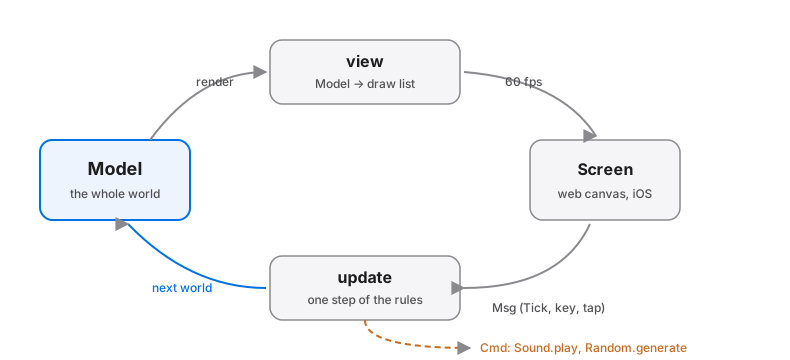
- The Model is the entire world in one immutable value: every enemy, every particle, every score digit, the camera, the phase.
updateis the rules. Given one message and the current world, it returns the next world. ATickadvances physics; a key press flips an input flag; nothing else can touch anything.viewis the camera crew. Given a world, it returns a description of one frame (a list of shapes). It changes nothing and decides nothing.- The runtime is the projector and the mail room: it schedules ticks, delivers input as messages, and blits the draw list to a real screen, on the web or on iOS.
Chapter 2 already showed the whole pattern in the flesh. This part of the book examines each arrow of the diagram: the tick that drives it (next chapter), the draw list (after that), and the two disciplines that make Mar games deterministic, integer math and seeded randomness.
There is no engine object
The thing to internalize is what is missing. There is no Game class, no scene graph, no entity registry, no spawn/despawn lifecycle. “Spawning” an enemy means the next Model’s list has one more record in it. “Despawning” means the next list does not. An enemy cannot dangle, leak, or be updated after death, because it is not an object with an address; it is a value in exactly one place.
This also means the dreaded engine-integration layer does not exist. Your game logic is not called by an engine through callbacks and virtual methods; your functions are the whole program, and the runtime’s only job is to keep calling them.
Why immutability is not slow here
The reflex objection: “you rebuild the whole world 60 times a second?” Two facts dissolve it.
First, rebuilding is mostly reusing. When one enemy moves, the new Model shares every unchanged part of the old one; a record update copies a handful of fields, not the world. Values that did not change are not copied, they are pointed at. This is how every immutable language works and Mar is no exception.
Second, a canvas frame was always going to be redrawn from scratch. UI apps diff trees to avoid touching the DOM; a game blits every frame regardless, so describing the frame fresh from the Model is not extra work, it is the same work with a name. The real performance boundaries are elsewhere (how many shapes, how much logic per tick) and chapter 14 measures them properly.
One doorway
Everything that happens to your game arrives as a Msg through update. The tick, the keyboard, the gamepad, the touch, the resize, a finished sound, a network reply in a multiplayer game: one union type lists them all, and the compiler checks you answered each one in every phase. When a bug does occur, it is reproducible by construction: the same starting Model and the same sequence of messages produce the same wrong world, every time, on every platform. The dev tools exploit this ruthlessly, letting you scrub time backward through your own bug.
That is the machine. Now, the clock that drives it.
The Tick
A game is a function of time, and time arrives as messages. One line requests it:
Time.every (Time.millis 16) (\_ -> Tick)
Sixteen milliseconds is one frame at 60 fps. This chapter is about what that line really does, because a game clock has to survive three enemies: displays that do not run at 60 Hz, devices that drop frames, and browser tabs that stop rendering entirely. Mar’s runtime has opinions about all three, and knowing them saves you from the classic mistakes.
Fast timers ride the display
Any Time.every interval of 20 milliseconds or less is not a timer in the setTimeout sense. The runtime attaches it to the display clock: requestAnimationFrame on the web, CADisplayLink on iOS. Your tick fires in lockstep with real frames, which is the only place a game tick is useful. (Slower intervals, like the one-second morph in the Touch-me-When example, run as ordinary timers.)
You can subscribe to both kinds at once: a 16 ms tick for the simulation and a one-second timer for a clock display coexist fine in one Sub.batch.
The game clock is not the display clock
Here is the scenario that breaks naive game loops. Your game does “one subscription tick = one step of the world” and a player opens it on a 30 Hz screen, or their phone throttles, or the browser hiccups for 200 ms. If ticks only fire with rendered frames, and each tick advances the world one step, the whole game runs at half speed: slow-motion music, floaty jumps, easy bosses. Speed as experienced by the player would depend on their hardware.
Mar’s runtime decouples the two clocks. Wall-clock time is accumulated, and when a display frame finally arrives, the runtime delivers as many pending ticks as have genuinely elapsed, up to a ceiling of four per frame. Each burst renders once. The consequences, measured on the real runtimes:
- On a 60 Hz display, one tick per frame, exactly as naive.
- On a 30 Hz display, about two ticks per frame: the game runs at full speed with fewer rendered frames.
- Under heavy throttling, up to four ticks per frame; beyond that the game slows rather than teleporting.
- After a long stall (say, five seconds), you do not get three hundred catch-up ticks and an enemy horde standing on your face. The ceiling caps the burst; the world resumes near where it paused.
What this means for you as a designer: a tick is a unit of game time, not of rendering. Never scale movement by measured elapsed milliseconds, and never count rendered frames. Write “the shot moves 5 pixels per tick” and let the runtime worry about how ticks map to frames. All the example games are written this way, and it is why the racer feels identical on a MacBook and a throttled phone.
Hidden tabs pause, by design
When a browser tab is hidden, the display clock stops, so your subscription tick stops, so your game pauses: physics, spawns, difficulty ramps, everything. On return, the catch-up ceiling prevents a fast-forward. For almost every game this is exactly right, and you get it without writing a pause system.
Two refinements worth knowing:
- Anything driven by the same tick pauses with it. This is the argument for driving music from the game world (chapter 10): a soundtrack played per-beat by
updatestops when the game stops, with no “music kept playing over the pause screen” bug. - A real pause feature (the player pressed Escape) is still yours to build, and it is two lines: a
Pausedphase whosesubscriptionsdrop the tick.
subscriptions model =
    case model.phase of
        Playing -> Sub.batch [ tick, keys ]
        Paused  -> Keyboard.onKeyDown KeyDown   -- only the unpause key
        _       -> Sub.none
Beats: the musician’s tick
Music runs on a grid too. At 120 BPM a beat is 500 ms, which is not a multiple of 16 ms, so do not count ticks and hope. Keep a millisecond accumulator in the model and step it by 16 per tick:
stepBeat : Model -> Model
stepBeat model =
    let
        t = model.msT + 16
    in
    if t >= 500 then
        onBeat { model | msT = t - 500, beat = model.beat + 1 }
    else
        { model | msT = t }
onBeat is where a rhythm game spawns its obstacles and where world-driven music plays its next groove step. Because the accumulator lives in the Model, the beat grid pauses, rewinds, and replays with everything else.
Determinism, guarded
One habit completes the picture: the tick handler ignores the timestamp (\_ -> Tick). The wall-clock time is real-world data, different on every run; let it into your simulation and replays die. The idiom throughout this book is that time advances the world by messages, never by measurement. The one legitimate use of Time.now in a game is outside the simulation: seeding a run, stamping a high score.
Next: what a frame actually is.
The Frame Is a Value
view does not draw. It returns a description of one frame, and the runtime draws that. The description is a plain list:
view : Model -> View Msg
view model =
    canvas Pixelated [ onResize Resized, onTap Tapped ]
        (List.concat
            [ [ rect 0 0 model.w model.h (rgb 11 16 38) ]   -- sky, deepest
            , List.map drawFoe model.foes                    -- world
            , hud model                                      -- HUD, on top
            ])
Order is depth. First in the list is painted first, so it sits at the back; there is no z-index, no layer system, no sorting API. You compose screens with List.concat and you reorder depth by reordering lists. This chapter is the complete catalog of what can go in that list.
The shapes
Five constructors cover every example game in the repository:
rect     x y w h color                 -- axis-aligned rectangle
circle   cx cy r color                 -- filled circle
triangle x1 y1 x2 y2 x3 y3 color       -- any filled triangle
text     x y size align color string   -- align: Canvas.Center | Canvas.Left | Canvas.Right
group    transforms shapes             -- a sub-list, transformed as one
All coordinates and sizes are Int, in logical pixels (more on that below). Colors come from two constructors:
rgb  246 196 83        -- opaque
rgba 246 196 83 45     -- alpha 0..100
That is the entire vocabulary. No sprites, no paths, no gradients. It sounds austere and it is; chapter 8 is about how much art these five shapes turn out to contain. What matters mechanically is that every shape is a value: drawFoe is a pure function from a foe to a list of shapes, your ship is a List Shape you can define once and stamp anywhere, and a frame is data you could inspect in a test.
Groups: transform once, move everything
group applies a list of transforms to a whole sub-list:
group [ Canvas.Translate wx wy, Canvas.Rotate angle ]
    [ rect (0 - 12) (0 - 4) 24 8 hull
    , triangle 12 (0 - 6) 22 0 12 6 nose
    ]
The idiom: draw at the origin, place with the group. The ship above is defined around (0, 0); the Translate puts it in the world and the Rotate (degrees, integer) turns hull and nose together. Nested groups compose, which is how a turret rotates on a tank that rotates on the map.
The available transforms, all constructors of Canvas’s own Transform type (qualified names, like all builtin constructors):
Canvas.Translate dx dymoves the sub-list.Canvas.Rotate degreesrotates around the group origin.Canvas.Scale percentscales around the origin; 100 is natural size. The racer draws its whole road at logical size and scales sprites by distance with this.Canvas.Alpha percentfades the group as one surface (see below).Canvas.Blend modechanges how the group’s pixels combine with what is beneath:Canvas.Add(light: glows, lasers, fire),Canvas.Multiply(shadow and tint),Canvas.Screen,Canvas.Erase,Canvas.Normal.
The camera is a Translate
There is no camera API because one transform is the whole feature:
world : Model -> List Shape
world model =
    [ group [ Canvas.Translate (0 - model.camX) (0 - model.camY) ]
        (List.concat [ tiles model, actors model ])
    ]
Everything inside the group is authored in world coordinates; the group shifts them into view. The HUD is simply drawn outside that group, in screen coordinates. Scrolling, screen-locked UI, parallax (several groups translated by different fractions of camX), and split-screen (two groups, two cameras) all fall out of this one idea.
One caution that has bitten a real game: a scaled or translated group is not clipped to any stage rectangle. If your world draws beyond the intended viewport (spawning enemies just off-stage, wrapping parallax bands), those shapes render happily outside it. On a canvas that exactly fits the stage nothing shows; on a letterboxed phone screen everything shows. Chapter 15 gives the standard fix (opaque mattes drawn after the world).
Transparency: rgba versus Alpha
Two tools, one classic bug. rgba sets alpha per shape: each shape blends with whatever is under it, including its neighbors in the same visual object. Give both circles of a smoke puff rgba ... 45 and their overlap paints twice: a darker seam, an accidental x-ray.
Canvas.Alpha fades a group as one composited surface: the group is rendered fully opaque off-screen, then blended once at the given opacity. Overlaps inside the group do not double-paint.
Rule of thumb: rgba for glass-like shapes that should show what is beneath them individually; Canvas.Alpha to fade a multi-shape object or a whole layer (the shmup fades its far parallax starfields with exactly Canvas.Alpha 62 and 84).
Pixelated, and why everything is chunky
The first argument to canvas picks the scaling flavor:
Pixelated: hard-edged pixels when scaled up. The retro look; almost every example game uses it.Crisp: smooth scaling, for games that want clean vector-like edges.
Behind both sits a deliberate runtime decision: the canvas renders at 1x logical resolution, not at the device’s retina scale. On a modern phone, rendering at full device resolution means pushing 9 times the pixels, and it is the difference between a game that runs and a “slow-motion” game on an iPhone; measured on real devices, 1x plus pixel-art upscaling was the version that held 60 fps. So: design in logical pixels, embrace the chunk. It is not a limitation you work around; it is the aesthetic the whole art chapter builds on. Keep text at size 10 or larger and it stays perfectly readable.
Reflow or fixed stage
Two honest ways to handle screen size, both used by shipped games:
- Reflow (Star Catch, Touch-me-When): subscribe to
onResize, keepw/hin the Model, compute every position from them. Best for UI-like games and one-screen arcade games. - Fixed stage (the shmup: 320×240): design on fixed coordinates, then scale and center the whole world group to fit the real canvas, with letterbox mattes. Best when the game’s balance depends on exact geometry. Chapter 15 builds this rig completely.
Pick one per game. Mixing them (some positions from w, some hard-coded) is where layout bugs live.
What the runtime does with your list
For the curious: on the web the list is drawn to an HTML canvas; on iOS, through SwiftUI’s Canvas. Same list, same order, same colors, pixel-for-pixel-identical intent, verified by golden-image tests per blend mode. You never think about it again, which is the point.
The frame is a value. Next: the numbers inside it.
Integer Worlds
Mar has no floating point. For general programming, The Book of Mar spends a chapter defending that; for games, the defense is shorter, because game developers already know the dirty secret: floats in a simulation are a liability you manage. They drift, they compare unreliably, and they round differently across platforms, which is why serious engines with replays or lockstep multiplayer end up rebuilding fixed-point math anyway. Mar just hands you that endpoint: all game math is Int, exact, and identical on the web, on iOS, and on the server.
(Decimal exists for money-like data and is a fine score multiplier, but simulations live on Int. This chapter is the toolbox.)
Sub-pixel motion: scale your units
The naive velocity is “pixels per tick”, and its smallest nonzero speed (1 px/tick = 60 px/s) is too fast for glide, too coarse for acceleration. The fix is the oldest trick on 8-bit hardware: store positions and velocities in a finer unit, convert only when drawing.
-- positions and velocities in millipixels (1 px = 1000 mp)

type alias Ball =
    { x : Int, y : Int, vx : Int, vy : Int }


stepBall : Ball -> Ball
stepBall b =
    { b
        | x = b.x + b.vx
        , y = b.y + b.vy
        , vy = b.vy + 40          -- gravity: 0.04 px/tick², exactly
    }


drawBall : Ball -> Shape
drawBall b =
    circle (b.x // 1000) (b.y // 1000) 6 (rgb 246 196 83)
Gravity of 40 millipixels per tick per tick gives the floaty arc a platformer wants, tuned in whole numbers. A jump is vy = 0 - 9000. Friction is a multiply-then-divide: vx = vx * 94 // 100 decays by 6% per tick with no float in sight. Everything in the examples that feels smooth (the racer’s road, the soccer ball’s rebound, the FPS raycaster) is this pattern at 1000× or some other scale that fits the game.
Choose the scale per quantity and write it down. 1000 is a good default: readable in the debugger (12500 is obviously 12.5 px) and roomy enough for gentle acceleration.
Division truncates; keep remainders on purpose
// truncates toward zero, and / is not for games (it produces an exact Decimal division, a different world). Two consequences:
-7 // 2is-3, not-4. If you need flooring or wrapping behavior (tile coordinates for a camera that can go negative, animation frames), use the positive-modulo helper from chapter 2,modI, and its companion floor division when needed.- Repeated divide-then-accumulate loses the remainder each time. Accumulate in the fine unit and divide only at the edge (drawing, display), exactly as
drawBalldoes.
No trig, and you will not miss it
There is no sin, cos, or sqrt, and the example games ship anyway. The workhorse substitutes:
Squared distances. Every “is it close enough” question compares squared lengths, no root required:
withinR : Int -> Int -> Int -> Int -> Int -> Bool
withinR x1 y1 x2 y2 r =
    let
        dx = x2 - x1
        dy = y2 - y1
    in
    dx * dx + dy * dy <= r * r
Octagonal distance when you need an actual length (aim assist, speed normalization), accurate to a few percent and used verbatim by the shmup to aim shots (iabs is one more two-liner for the math kit: if n < 0 then 0 - n else n):
octd : Int -> Int -> Int
octd dx dy =
    let
        ax = iabs dx
        ay = iabs dy
    in
    imax (imax ax ay) ((ax + ay) * 3 // 4)
Direction tables instead of angles. An 8-way or 16-way game does not need degrees; it needs a list of unit steps at your fixed-point scale:
-- 8 directions, millipixel unit vectors (707 ≈ 0.707 * 1000)
dirs : List { dx : Int, dy : Int }
dirs =
    [ { dx = 1000, dy = 0 }, { dx = 707, dy = 707 }
    , { dx = 0, dy = 1000 }, { dx = 0 - 707, dy = 707 }
    , { dx = 0 - 1000, dy = 0 }, { dx = 0 - 707, dy = 0 - 707 }
    , { dx = 0, dy = 0 - 1000 }, { dx = 707, dy = 0 - 707 }
    ]
The raycasting FPS goes further with a precomputed sine table at 1000× scale, ten lines of data for smooth rotation. When you find yourself wanting continuous angles, a small table at your chosen scale is always the answer, and Canvas.Rotate already covers the visual rotation of sprites in whole degrees.
Headroom
Two practical bounds keep you out of trouble. Mar’s parser rejects literals outside the safe integer range, and intermediate products are where games could reach it: with millipixel coordinates up to a million, dx * dx peaks around 10¹², comfortable everywhere. The rule of thumb: keep multiplied intermediates under about 10¹⁵ and you will never think about this again. If a formula multiplies three scaled quantities, divide once in the middle (a * b // 1000 * c // 1000) instead of once at the end.
Small numbers are a feature
The quiet benefit arrives at 2 a.m., in the time-travel debugger, when the ball is at x = 184500, vx = -2210 instead of x = 184.49999999999997. Integer worlds are legible. Tuning becomes arithmetic you can do in your head, desyncs cannot exist, tests assert exact values, and a replay of last week’s bug still reproduces to the pixel. This is the foundation the next chapter builds chance on.
Deterministic Chance
Games need dice, and dice are a problem for a pure language: a function that returns a different number each call is not a function. Mar offers two honest solutions, and choosing between them is easy once you see what each is for.
The Random module: chance as a command
Random is the app-style tool. You describe what kind of value you want with a Generator, and ask the runtime to produce one as a command; the result arrives as a message:
shapeGen : Random.Generator ColoredShape
shapeGen =
    Random.uniform (Circle Pink)
        [ Circle Orange, Square Purple, Square Blue ]


roundGen : Random.Generator Round
roundGen =
    Random.map2 Round shapeGen shapeGen


update msg model =
    case msg of
        Morph ->
            ( model, Random.generate Spawned roundGen )

        Spawned round ->
            ( { model | left = round.left, right = round.right }, Cmd.none )
This is exactly how the Touch-me-When example deals a new pair of shapes each second, and for that cadence it is perfect: an occasional roll, requested on an event, delivered next message. Use Random for title-screen shuffles, loot on a chest opened, “pick a random tip”.
For the sixty-times-a-second heart of a game, it has the wrong shape: the result arrives one message later, not inside step where the spawning logic lives, and the runtime owns the seed, so a run is not reproducible from your Model alone.
The in-model generator: chance as state
Every action game in the examples folder instead carries its own generator, five lines you met in chapter 2:
rnd : Int -> Int -> (Int, Int)
rnd seed n =
    let
        s2 = modI (seed * 16807) 2147483647
    in
    ( s2, modI (s2 // 64) (imax 1 n) )
This is the Park-Miller linear congruential generator: multiply the seed by 16807 modulo 2³¹−1, forever. Not cryptography, not statistics-grade; a completely respectable arcade die, the same family the consoles of the 80s used. Because it is plain integer math, it runs inside step, synchronously, and the current seed is a field of your Model like any other fact about the world.
The one discipline: every call consumes the seed and yields the next one, and you must thread it. Chained rolls look like this (from Star Catch’s spawner):
let
    (s2, rx) = rnd model.seed (model.w - 40)
    (s3, rv) = rnd s2 4
    star = { x = 20 + rx, y = 0 - 20, spd = 3 + rv }
in
{ model | stars = List.concat [ model.stars, [ star ] ], seed = s3 }
Reuse model.seed twice and both rolls come up identical, every time; forget to store s3 and next tick repeats this tick’s luck. The compiler cannot catch this one (both are well-typed), so it lives in Appendix B. The habit that prevents it: the last seed out always goes into the returned model, and never use a seed variable twice.
Helpers compose on top exactly as you would hope. A range roll is lo + rv; a percentage check is rnd seed 100 compared against a threshold; “pick one of n lanes, but not the last one used” is a roll plus a nudge. The card game builds shuffling on the same five lines, in a module shared by server and client.
Seeds are save files
Here is where the discipline pays out. The entire future of a run is determined by the starting seed plus the player’s inputs. That one sentence contains four features:
- Replays. Record the input messages (a few bytes each); replay them into
updatefrom the same seed and the identical run unfolds, to the pixel, on any platform. No video, no divergence. - Daily runs. Seed from the date and every player in the world faces the same board. Two lines: fetch
Time.nowoutside the simulation (at init or on Start), reduce it to a day number, store it as the seed. - Fair rematches. The card game’s “same deck, swap seats” rematch is literally “same seed, swap who goes first”.
- Reproducible bugs. A tester’s “it crashed on wave 7” comes with the seed in the Model; you now have the crash in a test harness, forever.
Variety, when you want it, is also explicit: mix player timing into the pot at a moment that does not matter for fairness, such as seeding from the tick count on which they pressed Start. One tap of human jitter is worth thirty-one bits of entropy, and the run is still fully recorded by its (seed, inputs) pair.
Which one, then
- Reach for
Randomwhen chance is an event: occasional, message-shaped, fine to arrive next frame. - Reach for the in-model LCG when chance is simulation: spawns, crits, drops, shuffles, anything inside the tick, anything you may ever want to replay.
Most games use both, and they do not conflict; they are two doors into the same Model. What matters is that in either case chance is data in the open, not a hidden global, and your game remains what this whole part of the book has been building: a pure function of seed and input, run very fast.
Input: Fingers, Keys, and Sticks
Your game will be played on a laptop keyboard, a phone screen, and, if you are lucky, a couch controller. Mar treats all three as first-class citizens with the same architecture: input arrives as messages, and you translate device events into game intent. This chapter is the full inventory, then the pattern that keeps three control schemes from becoming three games.
Keyboard
Two subscriptions deliver the stream:
subscriptions model =
    Sub.batch
        [ Keyboard.onKeyDown KeyDown    -- KeyDown : Keyboard.Key -> Msg
        , Keyboard.onKeyUp KeyUp
        ]
Keyboard.Key is a builtin union whose constructors are qualified, named by physical position (the W3C code standard): Keyboard.ArrowLeft, Keyboard.KeyW, Keyboard.Space, Keyboard.Enter, Keyboard.Escape, Keyboard.ShiftLeft, Keyboard.Digit1, and so on. Position-based naming means WASD stays WASD-shaped on an AZERTY keyboard, which is what a game wants.
The one idea that matters: events are edges, movement wants levels. Chapter 2’s pair of booleans is the standard converter, and it generalizes to a held-keys record. The complementary rule: actions want edges. A jump should fire on the key-down message, once, not “while held” (or the player hovers up the whole level). Down-edge for verbs, held-level for steering; most input bugs are one of these two applied backward.
Support both arrows and WASD, always; it costs four lines of case and spares every left-handed player.
Gamepad
Gamepad deliberately mirrors Keyboard:
Sub.batch
    [ Gamepad.onButtonDown PadDown     -- PadDown : Gamepad.Button -> Msg
    , Gamepad.onButtonUp PadUp
    , Gamepad.onStick PadStick         -- PadStick : Int -> Int -> Msg
    ]
Gamepad.Button covers the standard layout: Gamepad.A, Gamepad.B, Gamepad.X, Gamepad.Y, the d-pad as Gamepad.Up / Down / Left / Right, shoulders Gamepad.L1 / R1, and Gamepad.Start. The stick reports both axes as integers in −100..100, already dead-zoned (anything under 25% of throw arrives as 0), so a resting stick is exactly (0, 0) and you never write drift-filtering code. Gamepad.onRightStick is there for dual-stick games; the Norse FPS uses left to move, right to turn.
Because buttons and keys are both “edge messages carrying a union”, the natural move is to funnel them into the same handlers: the d-pad cases sit right beside the arrow-key cases and set the same booleans.
Touch
Touch (and the mouse; they share the pointer) comes through canvas attributes rather than subscriptions, because coordinates only mean something on the canvas:
canvas Pixelated
    [ onTap Tapped          -- Tapped : Int -> Int -> Msg, canvas-local x y
    , onDrag Dragged        -- pointer moved while down
    , onRelease Released    -- pointer lifted
    , onAltTap AltTapped    -- right-click / two-finger tap (desktop niceties)
    , onWheel Wheeled       -- scroll deltas, dx dy
    , onHover Hovered       -- desktop only; never gameplay (see below)
    ]
    shapes
There are no widgets on a canvas, so touch controls are shapes you draw plus arithmetic you own: a tap is a point, your buttons are rectangles, and update decides what was pressed. That sounds like a chore and is actually freedom; virtual controls can be anything. The shipped games use three schemes, in increasing order of effort:
- Direct manipulation (Star Catch, the party duel): the finger is the controller: drag the tray, tap the zone. Best when the game’s verbs map onto positions.
- Virtual buttons: draw fire and jump zones in the corners, hit-test taps against them, track held state from tap and release messages.
- Virtual pads: the FPS draws two thumb areas; a drag inside one is converted to a stick vector (distance from the anchor, clamped to the −100..100 scale, sharing the gamepad code path).
Reserve onHover for desktop garnish (tooltips, cursor highlights). Hover does not exist on touch hardware, and a mechanic that needs it will silently not exist on phones.
Device: choosing the scheme with facts
The wrong way to pick a control scheme is user-agent sniffing (iPads lie). The right way is Device, a live subscription of actual capabilities:
type Msg = DeviceChanged Device | ...

subscriptions model =
    Sub.batch [ Device.watch DeviceChanged, ... ]
The record answers with axes, not identities: pointer (Coarse or Fine), anyFine, supportsHover, viewport width/height, prefersDark, prefersReducedMotion. Two derived helpers settle the common cases: Device.touchOnly d (“show the virtual pads”) and Device.canHover d (“hover garnish is allowed”). It fires immediately with the current state and again on every change, so plugging a trackpad into an iPad mid-game genuinely switches your scheme if you wrote it to.
The examples’ convention, worth copying:
showPads : Model -> Bool
showPads model =
    case model.dev of
        Just d -> Device.touchOnly d
        Nothing -> False
And let it choose your copy too: the title screen that says “press Space” on desktops and “tap to start” on phones is a one-liner off the same record.
The intent layer
Here is the pattern that keeps three devices from tripling your logic. Devices produce device messages; update immediately translates them into intents; the simulation only ever sees intents.
-- device layer: many sources, one vocabulary
KeyDown Keyboard.ArrowLeft ->   press DLeft model
PadDown Gamepad.Left ->         press DLeft model
Dragged x _ ->                  steerToward x model     -- touch expresses intent directly

-- intent layer: one implementation
press : Dir -> Model -> (Model, Cmd Msg)
The simulation code never asks “was this a key or a button?”, the tutorial text is the only place that cares which devices exist, and adding a fourth input source (a second stick, a MIDI pedal, whatever arrives someday) is new cases in the translation layer and zero changes below it. Every multi-scheme example game converges on this shape; start there and skip the intermediate suffering.
Art from Rectangles
Mar cannot load an image. No PNG sprites, no tilesheets, no texture atlas. Your entire visual budget is rectangles, circles, triangles, and text, in flat colors.
Before you close the book: the games that made you love 2D games were drawn under budgets like this one. Early arcade and console art is rectangles with discipline; its beauty came from constraint, palette, and motion, not resolution. This chapter is a working method for getting real charm out of the five primitives, distilled from a soccer game, two RPGs, a racer, a shmup, and an FPS that were all drawn this way. The ethic throughout: be inspired by the classics, never trace them; your palette and shapes should be your own.
Palette first
Pick 8 to 16 colors before drawing anything, and give them names:
ink : Color
ink = rgb 24 20 37

sky : Color
sky = rgb 11 16 38

gold : Color
gold = rgb 246 196 83

blood : Color
blood = rgb 217 88 59
Named top-level colors keep the whole game consistent, make “night mode = swap the palette function” possible, and make tuning visual mood a five-minute job. A small palette is also what makes primitive art read as style rather than programmer art: three greens for foliage looks intentional; fifteen arbitrary greens looks like debugging.
(One language note: top-level values are evaluated in file order, so a palette constant may only refer to names defined above it. Keep the palette near the top of the file and this never bites; the full trap is in Appendix B.)
Sprites are functions
A “sprite” is a function from a position (and a frame) to shapes, drawn around a local origin and placed with a group:
hero : Int -> List Shape
hero frame =
    let
        bob = if modI frame 2 == 0 then 0 else 1     -- 2-frame walk bounce
    in
    [ rect (0 - 4) (0 - 14 + bob) 8 6 skin          -- head
    , rect (0 - 5) (0 - 8 + bob) 10 8 tunic         -- body
    , rect (0 - 5) 0 4 4 boot                        -- feet
    , rect 1 0 4 4 boot
    ]


drawHero : Model -> List Shape
drawHero model =
    [ group [ Canvas.Translate (model.hx // 1000) (model.hy // 1000) ]
        (hero (model.tick // 8))
    ]
Compose characters from few, chunky parts: head, body, feet is enough for a readable little person. Work on a mental pixel grid (everything a multiple of 1 or 2 logical pixels) and the result looks drawn rather than assembled.
Three specific tricks carry most of the load:
- Outlines by layering. There is no stroke, so a bigger dark shape behind a smaller bright one makes the classic outlined sprite:
circle x y (r + 1) inkthencircle x y r gold. The party-duel example draws all its pieces this way. - Silhouette test. If a character were all one color, could you still tell what it is and which way it faces? Fix shape before adding detail; detail cannot rescue silhouette.
- Face direction with asymmetry. A 2-pixel nose rectangle, a shifted eye, a weapon on one side. Flipping art is just negating the offsets in your sprite function (pass
dirin and multiply x-offsets by it).
Animation is arithmetic
With sprites as functions, animation is choosing arguments:
- Cycles:
modI (model.tick // 8) 2is a two-frame walk at 7.5 fps, the classic cadence.// 8is the animation speed dial. - Squash and stretch: wrap the sprite in
group [ Canvas.Scale 112 ]for 2 ticks on landing,Canvas.Scale 92at a jump’s apex. Two keyframes of scale read as weight. - Blinking (invulnerability, pickups about to expire): alternate the sprite with nothing:
if modI model.invulnT 8 < 4 then hero f else []. The shmup flickers its ship with a group alpha the same way. - Wobble: a 1-pixel
Translatealternating each few ticks makes anything nervous, alive, or about to explode.
Text is a sprite too
text with the Pixelated canvas already looks pleasantly retro, and it is the right tool for HUDs, dialogue, and menus. For big score counters and title logos where you want drawn letters, the soccer example goes further and builds a tiny pixel font: each glyph a list of row-strings, rendered as one rect per on-pixel:
glyph3x5 : String -> List String
glyph3x5 ch =
    case ch of
        "0" -> [ "###", "#.#", "#.#", "#.#", "###" ]
        "1" -> [ ".#.", "##.", ".#.", ".#.", "###" ]
        _   -> [ "...", "...", "...", "...", "..." ]
A dozen glyphs cover a scoreboard; the renderer is ten lines of nested mapping (String.toList gives the columns). It sounds absurd and takes twenty minutes, and afterward your numbers match your world perfectly at any scale.
Scenes: bands, parallax, and light
Backgrounds are horizontal bands (the cover of this book is six rects of sky and sea), and depth is layered motion, not detail:
- Parallax: two or three groups of scenery translated by fractions of the camera (
camX // 2,camX // 4); the shmup runs two starfield layers atCanvas.Alpha 62and84so the far one also reads farther. - Light:
Canvas.Blend Canvas.Addon a soft shape cluster is a glow: muzzle flash, torch halo, pickup shimmer.Multiplywith a dark blue rect over the whole world is instant night; over a band, instant fog. - Weather: a list of falling pixels (2×2 rects) recycled by
modIwrapping is rain or snow for one function’s effort; the racer’s four seasons are mostly palette plus one particle list.
Ship it chunky
Resist the urge to fight the aesthetic. The 1x pixelated canvas (chapter 5) rewards art that commits to being blocky: whole-pixel positions, hard color steps, few big shapes over many small ones. Every game in the gallery that looks good looks good because it leaned in. Rectangles are not what you are stuck with; they are what the style is.
Worlds and Collision
Collision is where “the world is a value” earns its keep or loses it. This chapter covers the three geometries that power every example game (boxes, circles, tiles), and then the one structural pattern that separates correct battle code from a subtle class of bug that shipped in a real RTS before it was caught.
The three geometries
Boxes (AABB). Axis-aligned rectangles overlap when they overlap on both axes. Store half-widths or width/height, whichever your game finds natural:
overlaps : Box -> Box -> Bool
overlaps a b =
    a.x < b.x + b.w && b.x < a.x + a.w
        && a.y < b.y + b.h && b.y < a.y + a.h
This is the workhorse: players, enemies, pickups, bullets, zones. At 2D-game speeds, generous boxes feel better than precise ones; a pickup box 20% larger than its sprite reads as “smooth”, and a player hurtbox 20% smaller reads as “fair”. Tune hitboxes as game design, not geometry.
Circles. Two circles touch when the squared distance between centers is within the squared sum of radii, no square root required (chapter 5):
touches : Int -> Int -> Int -> Int -> Int -> Bool
touches x1 y1 x2 y2 rr =
    let
        dx = x2 - x1
        dy = y2 - y1
    in
    dx * dx + dy * dy <= rr * rr
Circles suit anything round or radial: explosions, auras, “close enough to interact” checks, the soccer ball.
Points. A tap is a point; point-in-rect is two comparisons. All canvas UI (virtual buttons, card hands, map selection) is this.
Tile worlds
For RPGs, dungeons, and platformers, the level is the collision data. The examples store maps as lists of strings, one character per tile, which keeps levels diffable, editable in any editor, and visible in code review:
level : List String
level =
    [ "################"
    , "#..............#"
    , "#..##......~~..#"
    , "#..............#"
    , "################"
    ]


tileAt : Int -> Int -> Char
tileAt tx ty =
    case List.head (List.drop ty level) of
        Nothing ->
            '#'

        Just row ->
            case List.head (List.drop tx (String.toList row)) of
                Nothing -> '#'
                Just t -> t


solid : Char -> Bool
solid t =
    t == '#' || t == '~'
World position to tile position is integer division by the tile size: tx = x // 16. Out-of-bounds returns '#' at both lookups, so the world is safely walled by its own default, and tiles are Char values you can compare and case on directly.
Movement against tiles uses the oldest trick in the book, one axis at a time:
walk : Int -> Int -> Model -> Model
walk dx dy model =
    let
        x2 = if blockedAt (model.x + dx) model.y model then model.x else model.x + dx
        y2 = if blockedAt x2 (model.y + dy) model then model.y else model.y + dy
    in
    { model | x = x2, y = y2 }
Trying x and y separately is what makes characters slide along walls instead of sticking to them, and it is the entire secret of good-feeling grid movement. Check the corners of the moving box (both leading corners in the direction of travel), not its center.
Two speed rules keep tunneling away without real math: keep per-tick movement below the tile size, and keep bullets slower than the thinnest wall, or fatten the bullet’s box by its per-tick travel. Every example game lives happily inside those bounds.
Many against many: build the next world in one pass
Here is the load-bearing pattern. Shots hit foes; foes lose health; shots disappear; scores accrue. The tempting shape is a List.map over foes that computes damage inline, plus a separate filter for shots. The trap: any value you compute inside one branch of that map and do not carry out of it is gone. A real RTS shipped a bug where combat damage was computed inside a unit-update fold and accidentally discarded, so every shot did its work only on the tick it spawned. Nothing crashed; the game was just silently wrong.
The robust shape is a single fold that carries all the outputs in one accumulator record:
type alias Battle =
    { foes : List Foe, shots : List Shot, hits : Int }


resolve : List Foe -> List Shot -> Battle
resolve foes shots =
    List.foldl hitFoe { foes = [], shots = shots, hits = 0 } foes


hitFoe : Battle -> Foe -> Battle
hitFoe acc foe =
    case List.filter (touching foe) acc.shots of
        [] ->
            { acc | foes = List.concat [ acc.foes, [ foe ] ] }

        struck ->
            let
                hp = foe.hp - List.length struck
                survivors = List.filter (\s -> touching foe s == False) acc.shots
            in
            if hp <= 0 then
                { acc | shots = survivors, hits = acc.hits + 1 }
            else
                { acc
                    | foes = List.concat [ acc.foes, [ { foe | hp = hp } ] ]
                    , shots = survivors
                }
Note the argument order: Mar’s List.foldl hands your function the accumulator first, then the item (\acc foe -> ...), the reverse of some languages you may know. The compiler will usually catch a swap (the types differ), but with same-typed accumulators it cannot, so pin the habit now.
The payoff of the one-pass shape: consumed shots cannot hit two foes, killed foes cannot fire back this tick, every output (survivor lists, score, sound cues) leaves the function in the record, and the whole battle is one pure function you can feed fixtures in a test. When the interactions get truly gnarly, this function is where you aim the time-travel debugger, frame by frame, watching the record evolve.
Resolution order is a design decision
Immutability forces you to choose an order (movement, then combat, then pickups, then spawns) and encode it as the pipeline inside step. Write the stages as named functions and the frame becomes a sentence:
step : Model -> Model
step model =
    model
        |> movePlayers
        |> moveShots
        |> battle
        |> collectPickups
        |> spawnWave
        |> cullOffscreen
Whatever order you pick, it is the same on every platform and every run. There is no “physics happened before input this frame because a callback fired early”. The order is the code, and the code is the spec.
A Synthesizer in the Box
Mar does not play audio files. It ships a chip-tune synthesizer: you describe a sound as a value, the runtime synthesizes it, on the web through the Web Audio API and on iOS through a native audio engine. The same philosophy as the canvas, applied to air.
If you have never designed a sound effect, good news: the entire craft of 8-bit sound fits in one chapter, because the machines it imitates had exactly these knobs and no others.
Voices
The atom is a tone: a waveform at a frequency for a duration.
Sound.tone Sound.Square 440 120 -- wave, Hz, milliseconds
Four waveforms, four personalities:
Sound.Square: bright and buzzy. Leads, beeps, coins, UI.Sound.Triangle: soft and round. Bass lines, thumps, gentle chimes.Sound.Sawtooth: harsh and brassy. Alarms, engines, aggression.Sound.Noise: pitched static. Drums, explosions, wind, impacts.
Modifier functions wrap a tone and shape it (each patches the most recent voice, so they chain naturally):
Sound.volume 40 s          -- 0..100 (default 60)
Sound.duty 25 s            -- Square only: pulse width %, 12 / 25 / 50 are the classic three
Sound.sweep 880 s          -- glide the pitch to 880 Hz across the duration
Sound.hold 60 s            -- sit at the base pitch for 60 ms, then glide (needs a sweep)
Sound.vibrato 12 6 s       -- wobble: depth in cents, rate in Hz
Sound.arp [ 659, 784 ] s   -- cycle base + these pitches fast: a chord from one voice
sweep is the soul of retro sound effects: pitch going up reads as positive (jump, powerup, spawn), pitch going down reads as negative or physical (hit, fall, engine). duty is timbre for free: 50 is hollow, 25 is classic NES lead, 12 is thin and reedy.
Pitch helpers spare you the frequency table: Sound.a 4 is 440, Sound.c 5, Sound.fs 3 and friends cover the scale (naturals plus sharps, cs ds fs gs; spell flats as sharps).
Words and chords
Two combinators build everything else:
Sound.sequence [ s1, Sound.rest 80, s2 ]   -- one after another (rest = silence)
Sound.chord [ s1, s2, s3 ]                 -- at the same time
A sound effect is usually a short sequence; a musical hit is a small chord; a song (next chapter) is a chord of long sequences. Since these are ordinary values, name them at the top level and your whole sound design is a readable catalog.
Playing: cues from the world
Sound.play : Sound -> Cmd Msg fires a one-shot. The naive wiring plays sounds directly wherever something happens in update, and it works until your step function (pure, called by the tick) is the thing that knows a foe just died.
The pattern every action game converges on: step collects cues; update spends them. Give the world a list of cue values, have the simulation append to it, and have the tick handler turn them into commands and clear the list:
type Cue
    = CJump | CPickup | CHit | CBoom


Tick ->
    let
        next = step model
    in
    ( { next | cues = [] }
    , Cmd.batch (List.map (\c -> Sound.play (cueSound c)) next.cues)
    )
This keeps the simulation pure and testable (a test can assert “wave 3 emits exactly two CBoom”), survives replay and time travel cleanly, and gives you one place to implement muting, cue deduplication (“at most one hit sound per tick”, so a shotgun blast is not eleven overlapping clicks), and volume ducking. The card game and the shmup both ship this exact shape.
Muting is a command too: Sound.setMuted True. Keep the flag in your Model, flip both together, and put the button on the title screen; phones without a mute toggle are antisocial.
A starter cookbook
Six recipes tuned by ear in the example games; steal, then season. Volumes are deliberately modest: frequent sounds in the 15–40 range, rare payoffs louder.
sfxJump : Sound
sfxJump =
    Sound.volume 35 (Sound.sweep 620 (Sound.duty 25 (Sound.tone Sound.Square 250 90)))


sfxPickup : Sound
sfxPickup =
    Sound.sequence
        [ Sound.volume 30 (Sound.duty 25 (Sound.tone Sound.Square (Sound.e 5) 55))
        , Sound.volume 30 (Sound.duty 25 (Sound.tone Sound.Square (Sound.a 5) 90))
        ]


sfxHit : Sound
sfxHit =
    Sound.chord
        [ Sound.volume 45 (Sound.tone Sound.Noise 400 70)
        , Sound.volume 30 (Sound.sweep 60 (Sound.tone Sound.Triangle 160 90))
        ]


sfxBoom : Sound
sfxBoom =
    Sound.chord
        [ Sound.volume 60 (Sound.sweep 45 (Sound.tone Sound.Noise 900 320))
        , Sound.volume 35 (Sound.sweep 30 (Sound.tone Sound.Triangle 110 300))
        ]


sfxLaser : Sound
sfxLaser =
    Sound.volume 30 (Sound.sweep 140 (Sound.duty 12 (Sound.tone Sound.Square 980 110)))


sfxUiMove : Sound
sfxUiMove =
    Sound.volume 18 (Sound.duty 12 (Sound.tone Sound.Square (Sound.c 6) 35))
The design grammar behind them: direction of sweep = emotional sign; noise = matter; triangle underneath = weight; two quick notes up = reward. Almost every effect you need is a combination of those four sentences.
Mixing discipline
The synthesizer will happily let twenty voices shout. Rules of thumb from the shipped games:
- One sound per event, not per entity: gate duplicate cues per tick (the cue list makes this a
Listquestion). - Leave headroom: if everything is at volume 80, nothing is loud. HUD blips at 15–20, gameplay at 30–45, payoffs at 60+.
- Duck, do not stack: when the big boom plays, skip the small hits that tick.
- Respect silence. A sound on every tick reads as noise; sounds on meaningful edges read as music.
Speaking of music: it gets its own chapter, because loops have one rule that will save you a mystifying afternoon.
Music That Cannot Drift
Game music has one job description in two words: never wrong. Never playing over the pause screen, never continuing after death, never drifting against the action it is supposed to score. Mar gives you three ways to run music, and all three are declarative: you never call start or stop. You declare what should be sounding given the current world, and the runtime makes it so.
Loops: the jukebox is a subscription
Sound.loop and its siblings are subscriptions, not commands. Music belongs in subscriptions because music is a state, not an event:
subscriptions : Model -> Sub Msg
subscriptions model =
    Sub.batch
        [ gameplaySubs model
        , case model.mode of
            TitleScreen -> Sound.loop titleTheme
            WorldMap    -> Sound.loop mapTheme
            Battle      -> Sound.loop battleTheme
            Paused      -> Sub.none
        ]
The reconciliation rules are exactly what a jukebox should do: return the same Sound and it keeps looping untouched across updates; return a different one and the old song stops and the new one starts; return Sub.none and there is silence. Changing tracks is changing a case result. There is no music manager, and there is nothing to forget to stop.
Two siblings complete the family:
Sound.once s: plays s a single time while subscribed (a victory jingle on the win screen); unsubscribing early cancels it cleanly.Sound.ambient s: holds s as a continuous bed: an engine hum, wind, a crowd. Beds have a special power: returning the same bed at a new volume swells the live sound smoothly, and at a new pitch retunes it with a glide, never a restart click. The soccer example runs its crowd this way, cheering louder as the score tightens; the racer pitches its engine with your speed.
Writing a tune
A song is a chord of parallel voices, each voice a long sequence:
titleTheme : Sound
titleTheme =
    Sound.chord
        [ Sound.sequence melodyBars      -- Square, duty 25
        , Sound.sequence bassBars        -- Triangle
        , Sound.sequence drumBars        -- Noise
        ]
Work on a beat grid: at 120 BPM a beat is 500 ms, a bar of four is 2000 ms. Write helpers that make notes in beat units (n 1 (Sound.e 4) for a one-beat E) and the sheet music becomes legible code. Melody on a duty-25 Square, bass roots on the Triangle an octave or two down, percussion as short Noise hits with rests between: that trio is the entire classic chip ensemble, and one extra Square playing off-beat chords (or a single arp voice) is the luxury version.
The loop invariant
Here is the rule that will save you an afternoon: in a looped chord, every voice must sum to exactly the same total duration. The runtime loops each voice seamlessly; if the melody adds up to 8000 ms and the drums to 7995, the drums arrive 5 ms early on every pass, and two minutes in your song has smeared into soup. It fails slowly, which is what makes it mystifying if you have never been warned.
The discipline: pad every voice’s tail with Sound.rest to the bar total, and keep a per-voice sum comment you update when you edit:
-- each voice: 8 bars * 2000 ms = 16000 ms exactly
melodyBars = [ ... ]   -- 16000
bassBars   = [ ... ]   -- 16000
drumBars   = [ ... ]   -- 16000
Arithmetic on ms is integer arithmetic; the sums are checkable by eye, in a comment, or by a five-line test that folds durations. The repository keeps a checker script for its tunes for exactly this reason. When a looped song sounds subtly wrong after a while, check the sums first.
World-driven music: the flagship pattern
Loops are for menus and moods. For action, the examples do something better: the game world plays its own soundtrack. No Sound.loop at all; instead, the beat accumulator from chapter 4 fires inside step, and on each beat the simulation emits sound cues (the same cue-list pattern as chapter 9) chosen from the world’s state:
onBeat : Model -> Model
onBeat model =
    { model
        | beat = model.beat + 1
        , cues = List.concat [ model.cues, grooveStep model.beat model ]
    }
grooveStep looks at the beat number and the world and answers “what does the music do now”: bass note on every beat, kick on 1 and 3, melody phrase chosen by the current loop, a stinger when a wave spawns. The rhythm runner drives its entire soundtrack this way, nine loops of escalating arrangement, and the shmup scores each world with beat and melody cue streams.
What you buy for the extra structure:
- Perfect sync, permanently. Obstacles spawn on the same beat counter the music plays from. They cannot drift; they are the same integer.
- The pause bug is unrepresentable. Hidden tab, pause phase, game over: the tick stops, so the beat stops, so the music stops. Nothing to remember.
- Dynamic arrangement is a
case. More intense at low health, drums drop out in the shop, boss theme layers in at the boss: all justgrooveStepconsulting the model. - Time travel scrubs the score. Rewind the debugger and the soundtrack rewinds with the gameplay, which is as delightful as it sounds.
The trade: you are now the composer and the sequencer. Start with loops (they are two lines); graduate to world-driven when the game’s rhythm and the music’s rhythm deserve to be the same thing.
Original tunes only
A craft note as important as any invariant: compose your own. The chip idiom (square leads, triangle bass, noise drums) is a style, free for everyone; a specific melody is someone’s work. The example soundtracks are originals written in the style of the eras they honor, and the difference between “evokes” and “copies” is the difference between a soundtrack and a takedown notice. Eight notes you own beat thirty-two you borrowed.
Game Feel, Calmly
“Game feel” is the difference between pressing a button and hitting something. It is built from tiny confirmations: a flash, a hop, a click, a pause, stacked on the moment of impact. This chapter is the Mar toolbox for juice, and one strong opinion about restraint that the example games follow to the letter.
The doctrine: change the object, not the screen
When something gets hit, the temptation is to shake the camera, flash the screen, and spray thirty particles. Resist all three defaults. The doctrine, learned across a shooter, an FPS, and a card game:
Feedback belongs on the thing itself. The foe that was hit flashes; the tray that caught the star hops; the card that resolved glows. Effects attached to objects read instantly and stack cleanly. Effects applied to the whole screen read as chaos, tax readability exactly when the player needs it most, and, on a small phone canvas, make a meaningful fraction of players motion-sick.
So, concretely: never move the whole canvas. No screen shake, no full-screen jitter. When you want “the world felt that”, say it with color and light (a brief darkening of the background band, a one-tick Canvas.Add glow at the impact), not with motion of everything at once. If a player has prefersReducedMotion set (it is right there on the Device record), tone your remaining flashes down further; it costs one boolean and buys real comfort.
The five reliable ingredients
Each of these is a few lines in step plus a timer field in the Model. Impact frames earn a small state record (hitT, flashT, and friends) counting down to zero.
1. Hit flash. Swap the victim’s palette to white (or its own bright variant) for 2 or 3 ticks:
foeColor : Foe -> Color
foeColor foe =
    if foe.hitT > 0 then rgb 255 255 255 else foe.baseColor
2. Hit-stop. For big impacts only: freeze the participants for 2 to 4 ticks (skip their movement while stunT > 0). The world around them continues, which is what sells the weight without any camera trickery.
3. Squash and stretch. Canvas.Scale 112 on the group at landing, Canvas.Scale 92 at the top of a jump, two ticks each. Scale on the object’s group, never the world group.
4. Sound on every verb. Chapter 9’s cue list means each player action can carry a click for nearly free. A jump without a sound is a spreadsheet operation; add CJump and it is a jump.
5. Death pacing. When something important dies (especially the player), do not cut instantly to the message. Let the death effect finish, hold a beat of quiet (30 to 50 ticks), then show the text. The FPS shipped this as a deliberate fix after playtests: the pause is what lets a defeat land. A dyingT countdown phase between Playing and Over is the whole implementation.
Telegraphs: feel’s defensive half
Juice confirms what happened; telegraphs announce what is about to. The standard the example games settled on: about 700 milliseconds of warning (roughly 42 ticks) before an enemy’s attack, expressed on the enemy’s own body: a windup crouch (shift the sprite down 2 pixels), a color shift toward its attack color, a rising two-note cue.
The same doctrine applies: the warning lives on the object. A boss whose eyes go red is readable in a crowd; a screen-edge flash could be anyone. Telegraph durations are gameplay constants (players learn them like music), so name them at the top level next to the palette.
Particles, small and meaningful
A particle list is a fine tool at 2D scale: a List of { x, y, vx, vy, t } stepped like everything else and drawn as 2×2 rects. The restraint rules:
- Spawn a handful (4 to 8) per event, with meaning: sparks fly from the impact point, in the direction of the hit.
- Lifetime under half a second; fade by switching to a dimmer color at half-life rather than alpha-ramping every particle.
- Particles are garnish. If removing an effect makes the game unreadable, it was doing a telegraph’s job; promote it to a real telegraph.
The one-in-three rule
Cap any single event at three simultaneous effects (say, flash + sound + 5 sparks). Beyond that, effects mask each other and the next event’s readability suffers: the second enemy’s telegraph has to compete with the first enemy’s death fireworks. The example games that feel best are not the ones with the most juice; they are the ones where every effect can be read. Silence and stillness are what make the loud moments loud.
Feel is a craft of subtraction as much as addition. Add the five ingredients, keep them on the objects, cap the stack, honor reduced-motion, and your game will feel sharp on a MacBook and considerate on a phone, which is most of what “polish” means at this scale.
The Shape of a Real Game
Star Catch fits in one file, and one file is the correct architecture until it is not. This chapter is about what changes between the 250-line demo and the 5000-line game: how shipped Mar games organize code, model their phases, script their setpieces, and test themselves, plus the two structural traps that only appear at scale.
One file, then three
Stay in a single Main.mar as long as scrolling does not hurt; several finished examples never leave it. When you split, the pattern the larger games converge on is small and boring:
Types.mar: the Model, the Msg, the core records, the constants, and the pure helpers everyone needs (imax,modI,rnd). The RTS keeps its LCG here.- Data modules: levels, dialogue, bestiary, card lists: big honest values, one module per kind. The adventure-port generates these from tooling; hand-written works the same.
Main.mar: the loop:update,view,subscriptions, wiring.
Modules are files; import Types exposing (..) pulls the vocabulary in. Resist inventing deeper structure than that. A game is one program with one Model; carving it into fifteen “systems” modules mostly manufactures import ceremony.
Phases are a union, and the union is the spec
Every game is a state machine at the top:
type Phase
    = Title
    | Briefing Int          -- which mission's text is showing
    | Playing
    | Dying Int             -- countdown to the game-over screen
    | Over Outcome
Two structural choices, both fine, chosen per game:
- Flat Model plus a
phasetag (most examples): every field lives in the Model at all times; phases say which ones matter. Simple, hot-reload-friendly, mild discipline required (the score exists on the title screen; nobody looks at it). - Payload phases (
Briefing Int,Over Outcome): put phase-specific data in the constructor. The compiler then guarantees a mission number exists exactly when briefing, which is worth having wherever a bare flag would need a comment.
Whichever you choose, the dividend is the same: case model.phase of in update, view, and subscriptions is checked for exhaustiveness. Adding a Shop phase and following the compile errors is the implementation plan.
Setpieces are timers, not scripts
Bosses, cutscenes, and wave intros need sequenced behavior over time, and there is no coroutine to “wait 2 seconds” in. The idiom, used by every boss in the gallery: a phase field on the actor plus a countdown, stepped by the tick.
stepBoss : Boss -> Boss
stepBoss boss =
    let
        t = boss.t - 1
    in
    if t > 0 then
        { boss | t = t }
    else
        case boss.act of
            Gliding  -> { boss | act = Winding, t = 42 }    -- 700 ms telegraph
            Winding  -> { boss | act = Charging, t = 30 }
            Charging -> { boss | act = Gliding, t = 90 }
A cutscene is the same machine at page scale: a list of steps in the Model, a timer, advance on expiry or on tap. It looks unglamorous next to a scripting DSL and it debugs like a dream: the entire “script position” is two fields you can see in the time-travel panel.
Two traps that arrive with size
Top-level values evaluate in file order. A top-level value (a palette color, a level list, a precomputed table) is evaluated eagerly, top to bottom. If it refers to a name defined below it in the file, the program can compile and still crash at startup with a unit value where data should be. Functions are immune (they run later); values are not. The rule: constants and data flow strictly downward: palette, then tables built from the palette, then things built from tables. When a big data module misbehaves at boot, look for a forward reference first.
A fold that computes and drops. Described fully in chapter 9’s battle section, restated here because it is a scale trap: it only appears once several systems interact in one pass. Any value computed inside a fold’s branches must leave through the accumulator, or it did not happen. The RTS shipped a real bug this way (damage computed mid-fold, discarded, shots working only on their first tick). When battle math is mysteriously weak, audit the folds.
Tuning lives at the top
Every number a designer might touch goes in one named block near the top of Types.mar or Main.mar: speeds, costs, timers, telegraph durations, spawn tables. Two reasons beyond tidiness. Hot reload turns each constant into a live slider: change gravity mid-jump and feel it. And numbers with names document intent (coyoteTicks = 5) where a 5 in a formula documents nothing.
Your game is a library with a loop on top
The quiet consequence of everything above: because step and its helpers are pure functions over plain data, they do not need the canvas, the browser, or the app shell to run. The rhythm runner exploits this by running a bot through its real physics in a script to prove every level is beatable before shipping; the card game’s rules module is exercised by the server, the client, and its tests identically. When you structure a game as “a pure rules library plus a thin MVU rind”, testing stops being a game-dev luxury and becomes ordinary unit testing, and chapter 17’s multiplayer falls out of the same property.
Next, the chapter where we count milliseconds.
Sixty Frames on a Budget
Mar’s runtime is a tree-walking interpreter. There is no JIT, no compilation to native code; your step and view are evaluated structure by structure, sixty times a second. This chapter is honest about what that budget buys, how to measure it, and the seven techniques that kept the heaviest example games at sixty.
What the budget actually is
The proof points, all shipping in the repository and all holding 60 fps on ordinary hardware:
- A real-time strategy game stepping hundreds of units with flow-field pathfinding.
- A raycasting first-person dungeon crawler (a screen-wide column render, per frame).
- A pseudo-3D racer projecting a curving, hilly road.
- A ten-stage shmup with layered parallax, dozens of actors and shots, and per-beat music.
So the budget is generous for 2D-game logic. What it is not is infinite in the direction people expect: the cost is rarely your game rules; it is almost always the size of the frame description. A thousand game-logic decisions are cheap; a thousand shapes in the draw list, rebuilt and serialized every frame, are the actual bill.
Measure before touching anything
Dev mode surfaces frame cost (real milliseconds per frame, not just the frame rate, which quantizes to 60/30 and hides everything). Watch it while playing the busiest moment of your game: boss plus bullets plus particles. The reading tells you which world you are in:
- Under ~8 ms: ship it. Do not optimize.
- 8 to 16 ms: you are spending headroom; fine on desktop, watch a phone.
- Over 16 ms: dropped frames; time for this chapter.
Then find out which half: temporarily return a minimal frame from view (one rect). If the cost collapses, it is the draw list; if it does not, it is step. That one experiment aims all the work below.
Shrinking the draw list
In rough order of payoff, as measured on the racer during its optimization rounds:
1. Draw less scenery. The single biggest wins were density cuts: fewer sky bands, fewer snowflakes, fewer roadside trees. Decorative counts are tuning constants; halve them and look. Nobody missed the fourth layer of stars.
2. Cull off-screen early. Skip actors outside the viewport before building their shapes, with a cheap bounds test. One if per entity beats four shapes per entity.
3. Level-of-detail by distance. Far things are small: draw the 1-rect version beyond a threshold and the 6-shape version near. The racer’s roadside sprites and the FPS’s far walls both do this.
4. Precompute static geometry. Anything that does not depend on the frame (the road’s segment table, a level’s wall rects, a pixel-font’s glyph rects) belongs in a top-level value, computed once, not rebuilt in view. (Mind the file-order rule from the previous chapter.)
5. Hoist the colors. rgb calls inside a per-entity loop allocate every frame. Name colors at the top level (you did this for the palette anyway) and inner loops just reference them.
Taming step
6. Stagger the brains. AI does not need to think at 60 Hz. The RTS re-plans a slice of its units per tick (unit index modulo N equals tick modulo N); every unit still moves each tick, but pathfinding amortizes 10× with no visible change.
7. Cap the populations. Particles, shots, corpses, floating numbers: give each list a maximum and drop the oldest. Bounded lists turn worst-case frames into average frames, and no player has ever counted your particles.
Beyond the seven: prefer a single fold that does three things over three traversals of the same list; keep squared-distance checks before expensive logic, not after; and leave update’s message dispatch alone; it is never the problem.
Phones, and the 1x dividend
The same code runs on iOS with its own natively optimized runtime; the interpreter fast paths were tuned specifically so game workloads (arithmetic and record updates in hot loops) run lean. The letterboxed 1x canvas from chapter 5 is the other half of mobile performance: the fill-rate story that would sink a retina-resolution canvas simply never starts.
Two mobile-specific habits: test the busiest scene on the oldest device you care about, not your dev machine, and remember that a warm phone throttles: a game at 15 ms per frame on a cool phone is a game at 19 ms twenty minutes later. Target 12 or better where you can. The tick’s catch-up machinery (chapter 4) keeps the game correct under throttling, but frames you never drop feel best.
The order of operations
When a game is slow, do these in order and stop when fast: measure; determine draw versus step; cut scenery density; cull and LOD; precompute and hoist; stagger AI; cap lists. Resist rewriting game rules for speed; in every measured case so far, the rules were innocent, and clarity you trade away during a panic never comes back.
One Game, Every Screen
You wrote the game once. This chapter is about the last honest mile of “runs everywhere”: making one set of coordinates look right on a 27-inch monitor and a phone in portrait, keeping input fair across finger and mouse, and putting the same file on iOS as a native app.
The two layout postures, revisited
Chapter 5 named them; here is how to choose. Reflow (positions computed from the live w/h) suits games whose board is the screen: Star Catch, the party duel, most puzzles. Fixed stage suits games whose balance depends on exact geometry: the shmup’s 320×240 arena, where “enemies enter at y = −16” is a gameplay fact that must not depend on the player’s monitor.
Reflow needs no machinery beyond onResize. Fixed stage needs the rig this chapter builds.
The fixed-stage rig
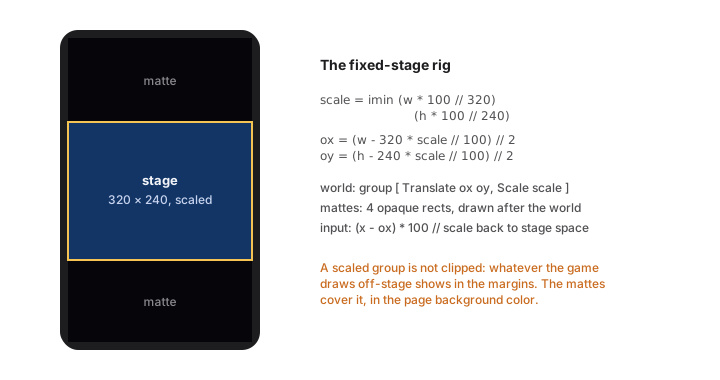
Three pieces, in order. First, compute the fit (integer math, percent scale):
gameW : Int
gameW = 320

gameH : Int
gameH = 240


layout : Model -> { scale : Int, ox : Int, oy : Int }
layout model =
    let
        scale = imin (model.w * 100 // gameW) (model.h * 100 // gameH)
        pw = gameW * scale // 100
        ph = gameH * scale // 100
    in
    { scale = scale
    , ox = (model.w - pw) // 2
    , oy = (model.h - ph) // 2
    }
Second, draw the world inside one transformed group, then the HUD, then the mattes:
view model =
    let
        lay = layout model
    in
    canvas Pixelated [ onResize Resized, onTap Tapped ]
        (List.concat
            [ [ rect 0 0 model.w model.h pageBg ]
            , [ group [ Canvas.Translate lay.ox lay.oy, Canvas.Scale lay.scale ]
                  (stage model)                          -- the whole game, in 320×240 space
              ]
            , mattes model lay                            -- cover the margins, AFTER the world
            ])


mattes : Model -> { scale : Int, ox : Int, oy : Int } -> List Shape
mattes model lay =
    let
        pw = gameW * lay.scale // 100
        ph = gameH * lay.scale // 100
    in
    [ rect 0 0 model.w (imax 0 lay.oy) pageBg
    , rect 0 (lay.oy + ph) model.w (imax 0 (model.h - lay.oy - ph)) pageBg
    , rect 0 0 (imax 0 lay.ox) model.h pageBg
    , rect (lay.ox + pw) 0 (imax 0 (model.w - lay.ox - pw)) model.h pageBg
    ]
The mattes are not decoration; they are correctness. A scaled group is not clipped to the stage. Your game constantly draws outside its arena (spawns above the top edge, parallax wrapping past the sides), and on a desktop window that exactly fits, none of it shows, so you will not notice. On a tall phone, the margins expose your backstage. The shmup shipped this lesson: opaque rects over the four margins, drawn after the world, in the page background color, so the stage reads as a framed arcade screen everywhere. If you letterbox, matte.
Third, map input back into stage space, the inverse transform:
toStage : { scale : Int, ox : Int, oy : Int } -> Int -> Int -> { x : Int, y : Int }
toStage lay x y =
    { x = (x - lay.ox) * 100 // imax 1 lay.scale
    , y = (y - lay.oy) * 100 // imax 1 lay.scale
    }
Every tap and drag goes through toStage before the game sees it, and the entire simulation stays innocent of screens.
Phone manners
A grab-bag of facts that make the web build feel intended on phones, all standing on framework behavior you get for free but should know exists:
- Full-bleed canvas. A page whose root is a canvas fills the real viewport, safe areas handled. Keep your HUD a design margin (20-odd stage pixels) away from edges anyway; notches and home indicators overlay the extremes.
- No accidental selection. On game pages the runtime disarms iOS text selection, callouts, and sticky tap highlights, so a frantic player mashing the screen does not summon a magnifying glass mid-boss. You still owe them hold-friendly design: nothing in a game should require a long-press (that is where OS gestures live).
- Hover does not exist here. Restated from chapter 7 because it is the number-one desktop-developer reflex: any affordance shown on hover needs a visible-at-rest version on touch.
- Orientation is a resize. Rotating fires
onResizelike any other size change; reflow games adapt free, fixed-stage games re-letterbox. Decide which orientation your game means and design the other to at least be playable.
iOS, natively
The same project builds a real iOS app:
mar build --target ios
This scaffolds a complete Xcode project into dist/ (configured from an "ios" block in mar.json): open it, press run, and your game is on the simulator or device with the five game modules running natively: SwiftUI-canvas rendering, display-link ticks, the audio-engine synthesizer, GameController gamepads, hardware keyboards.
Development on-device is kinder than you expect: a debug build finds your running mar dev server on the local network (it adopts only a server running the same app name, and shows a banner when connected), so you get hot reload on the phone in your hand. Ship builds embed everything; TestFlight and the App Store take it from there like any Swift app.
What deserves real testing on the device, in order: input feel (thumb sizes, drag thresholds), audio volume against the phone speaker, performance in the busiest scene (chapter 14’s habits), and the letterbox on the tallest current phone. The logic needs no re-testing; that is the whole point of one source of truth.
The parity contract
The reason this chapter is short given what it does: the platform work already happened, in the runtimes, held by conformance tests. Draw lists render the same, integer math agrees to the digit, the same seed shuffles the same deck. “Multiplatform” in Mar is not a porting activity; it is a property you inherit and then respect at the edges (layout, input, volume). Respect it at those three, and the phone build is a checkbox, not a project.
Beyond One Device
Multiplayer is a spectrum, and honesty first: Mar’s box does not contain realtime netcode. There are no websocket rooms, no client prediction layer, no lobby service. What it contains is arguably better for the games this book is about: everything you need for asynchronous multiplayer (turn-based games, daily challenges, leaderboards) with a property most netcode teams dream of: a shared, deterministic rules engine that cannot desync. The card game in the examples is a complete two-player game built this way; this chapter is its pattern, generalized.
The architecture: one rules module, two executors
Turn a game multiplayer and the dangerous question appears: who computes the truth? The classic failure modes are trusting the client (cheaters) or duplicating the rules server-side in another language (drift, forever). Mar’s answer is structural:
Shared.mar      the rules: types, legal moves, applyMove, the LCG
Backend/…       services: create match, submit move, fetch state
Frontend/…      pages: render the match, send the moves
Shared.mar is imported by both sides of a fullstack app. The Go-powered backend executes it to validate and advance matches; the JS frontend executes the same functions to predict and render. They cannot disagree, because integer math plus pure functions is bit-identical on every runtime (the Part I promise, now load-bearing). The rules are written once, in the language your game is already in.
The match is data
A match record is the whole truth of one game between two people, stored with the Repo like any other row:
-- in Shared.mar: the moves are data, the state is derived
type Move
    = PlayCard Int
    | Pass

applyMove : Move -> MatchState -> MatchState
Store the seed and the move list, derive the state by folding applyMove; or store the state snapshot and validate each incoming move against it. The examples do the second (snapshots are simpler to query), but the first is worth knowing: it makes every finished match a replay file for free.
The service surface is small and ordinary; async multiplayer is CRUD with rules:
POST /matches: create, seed the deck (server picks the seed).POST /matches/:id/moves: body carries theMove; the handler loads the match, checkslegal move statewith the shared function, applies, saves.GET /matches/:id: fetch for rendering.
The server validating with the same legal function the client used to enable buttons is the anti-cheat: a hacked client can send anything and accomplish nothing.
Turns arrive by polling, and that is fine
Correspondence games do not need push. The match page subscribes to a slow clock while it is the rival’s turn and refetches:
subscriptions model =
    if model.myTurn then
        Sub.none
    else
        Time.every (Time.seconds 5) (\_ -> Poll)
Five-second polling on a tiny GET is invisible on any server and immediate enough for games measured in turns. (One field note from the shipped game: space out bursts of writes; a client firing many POSTs in quick succession will meet the framework’s rate limiter and see a polite retry error. Batch a turn into one move payload rather than five.)
Auth is the framework’s passwordless sign-in (one Auth.protect on the services); matchmaking at this scale is a table of open challenges you list and claim. A bot opponent is the cherry: the same Shared rules module, a pickMove function, and the server (or even the client) plays the other seat. The card game ships exactly this as its practice mode.
Daily seeds and honest leaderboards
The lightest multiplayer is everyone versus the same dice. Chapter 6 built it: seed the run from the date and all players face the same board. The fullstack version adds one table and one beautiful trick:
POST /scoressubmits not a number but the input recording: seed plus the player’s move list (a few hundred bytes for most arcade games).- The handler replays the inputs through the shared rules and computes the score itself.
A submitted score is not a claim; it is a proof, checked by the same deterministic engine, at the cost of a few milliseconds of server fold. Forged scores are structurally impossible instead of moderated after the fact. Determinism, once again, doing jobs other stacks buy infrastructure for.
When you outgrow this
Real-time rooms (everyone sees everyone move, sub-second) are genuinely out of scope today; that is a future-framework conversation, not a pattern you can fake well with polling. If your design needs 200 ms reactions between players, build that part elsewhere. But before you conclude you need it, look again at the genres that thrive async: card battlers, word duels, chess-likes, roguelike dailies, territory games, anything with turns or with parallel solo runs compared after the fact. That space is enormous, underserved, and exactly what one person can ship, which is the spirit of this whole book.
Shipping It
A finished game nobody can reach is a diary entry. This chapter is the last mile: putting the web build on a URL, the iOS build on a phone, and the ten-minute checklist that separates “works on my machine” from “works on the bus”.
The web build
Deployment is declared in mar.json and executed by one command. For a frontend-only game (most games in this book), the static target is the right one; the example games deploy to Cloudflare Pages:
{
  "name": "star-catch",
  "deploy": {
    "cloudflare-pages": {
      "app": "star-catch",
      "account": "env:CLOUDFLARE_ACCOUNT_ID",
      "apiToken": "env:CLOUDFLARE_API_TOKEN"
    }
  }
}
mar deploy star-catch
That builds the production bundle and publishes it; your game is on a real URL, HTTPS included, a minute later. Credentials come from the environment (the env: indirection), so nothing secret lives in the repo. A fullstack game (chapter 16’s multiplayer) declares a fly block instead and deploys as a self-contained server binary with its database; same single command, and the CLI walks you through provisioning and secrets the first time.
Two production notes for game pages specifically. The web build is a static bundle, so once loaded it keeps playing on flaky café Wi-Fi; only services need the network. And there is no client-side save API in the box today: a frontend game’s progress lives for the session. If persistence is part of the design (unlocks, best scores), that is the fullstack path with the Repo, plus sign-in if scores follow the player.
The iOS build
mar build --target ios
scaffolds the complete Xcode project into dist/ from the "ios" block in your manifest (bundle id, display name). From there it is the ordinary Apple pipeline: run on a device from Xcode today, TestFlight for friends this week, App Store review when ready. The game modules are native; there is no web view to explain to a reviewer.
The debug build’s dev-server auto-connect (it finds your mar dev by matching app name on the local network, with a visible banner) makes device-in-hand iteration the pleasant part of an iOS release, which may be a first.
The ship checklist
Every item on this list is cheap before launch and embarrassing after. The example games’ collective scar tissue, in checklist form:
Feel and fairness
- Playable start to finish with each input scheme alone: keys only, touch only, pad only (whichever you support).
- The busiest scene holds frame rate on the oldest phone you care about (chapter 14’s measure-first ritual).
- Difficulty ramp survives a stranger. Watch one person play without speaking; where they die confused, add a telegraph.
Manners
- A mute button, working, findable on the title screen (
Sound.setMuted). - A pause (subscriptions drop the tick; chapter 4 made it two lines).
-
prefersReducedMotionhonored (chapter 12’s flashes toned down). - Nothing depends on hover, long-press, or right-click.
Screens
- Resize and rotation mid-game: reflow adapts, fixed stage re-letterboxes, mattes cover (chapter 15).
- HUD clear of notches and home indicators on the tallest phone.
- Text readable at 1x on a small phone: sizes 10 and up, tested, not assumed.
Truth
- Title, restart, and game-over loops exercised twenty times in a row (the restart-state bug hides here: some field
startforgot to reset). - For deterministic features: a recorded run replays identically after your latest balance patch. If not, you changed the rules; version your seeds or invalidate old replays deliberately.
- Sound mix checked on laptop speakers, phone speaker, and one pair of headphones (they disagree more than you think).
Version your tuning like the code it is
Post-launch, the temptation is to hot-patch difficulty constantly. Do, but leave tracks: every tuning constant already lives in one named block (chapter 13), so a balance patch is a diff a player could read. If your game has replays, daily seeds, or leaderboards, remember what chapter 16 established: the rules are the protocol. A physics tweak invalidates old proofs; ship those as marked seasons, not silent edits.
Send it
The whole pipeline, end to end: mar dev while you build, mar deploy when the web build is ready, mar build --target ios when it deserves a home screen icon. No engine licenses, no export templates, no build farm: a language, a folder, and a game that runs everywhere you promised the cover it would.
What remains is the part no book supplies: the fifty small decisions that make your game feel inevitable. The appendices will keep the machinery out of your way while you make them.
Appendix A: The Game Cheat Sheet
The whole game-facing surface, in the exact shapes used throughout this book and the example games. Keep this page open while coding.
Wiring
module Main exposing (main)

import Canvas exposing (canvas, rect, circle, triangle, text, group, rgb, rgba, onTap, onDrag, onRelease, onResize)
import Keyboard
import Time

init : (Model, Cmd Msg)
update : Msg -> Model -> (Model, Cmd Msg)
view : Model -> View Msg
subscriptions : Model -> Sub Msg

page : Page
page =
    Page.create
        { path = "/", title = "My Game"
        , init = init, update = update, view = view, subscriptions = subscriptions
        }

main : Cmd ()
main =
    App.frontend [ page ]
Run: mar dev my-game · Deploy web: mar deploy my-game · iOS project: mar build --target ios
Canvas
canvas Pixelated [ attrs ] shapes -- Pixelated (hard pixels) | Crisp (smooth); bare names
Shapes (all coordinates Int, list order = depth, first = back):
rect     x y w h color
circle   cx cy r color
triangle x1 y1 x2 y2 x3 y3 color
text     x y size align color str      -- align: Canvas.Center | Canvas.Left | Canvas.Right
group    [ transforms ] shapes
Colors: rgb r g b · rgba r g b a (alpha 0..100)
Transforms (qualified constructors):
Canvas.Translate dx dy      Canvas.Rotate degrees      Canvas.Scale percent
Canvas.Alpha percent        Canvas.Blend mode
-- modes: Canvas.Add | Canvas.Multiply | Canvas.Screen | Canvas.Erase | Canvas.Normal
Canvas events (attributes; coordinates are canvas-local Int):
onResize Resized     -- Resized : Int -> Int -> Msg   (fires with the size, and on change)
onTap Tapped         -- Tapped : Int -> Int -> Msg
onDrag Dragged       -- pointer moved while down
onRelease Released   -- pointer lifted
onAltTap AltTapped   -- right-click / two-finger tap
onWheel Wheeled      -- scroll deltas dx dy
onHover Hovered      -- desktop garnish only
The tick
Time.every (Time.millis 16) (\_ -> Tick)     -- ≤ 20 ms rides the display clock
Time.every (Time.seconds 1) (\_ -> Second)   -- slower = ordinary timer
One subscription tick = one unit of game time. The runtime catch-up (max 4 ticks per rendered frame) keeps speed constant on slow displays; hidden tabs pause.
Keyboard and Gamepad
Keyboard.onKeyDown KeyDown       -- KeyDown : Keyboard.Key -> Msg
Keyboard.onKeyUp KeyUp
-- keys: Keyboard.ArrowLeft/Right/Up/Down, Keyboard.KeyA..Z, Keyboard.Space,
--       Keyboard.Enter, Keyboard.Escape, Keyboard.ShiftLeft, Keyboard.Digit1..

Gamepad.onButtonDown PadDown     -- PadDown : Gamepad.Button -> Msg
Gamepad.onButtonUp PadUp
Gamepad.onStick PadStick         -- PadStick : Int -> Int -> Msg, each −100..100, deadzoned
Gamepad.onRightStick PadRStick
-- buttons: Gamepad.A/B/X/Y, Gamepad.Up/Down/Left/Right, Gamepad.L1/R1, Gamepad.Start
Device
Device.watch DeviceChanged       -- fires current state immediately, then on change
-- record: pointer (Coarse | Fine, bare), anyFine, supportsHover,
--         width, height, prefersDark, prefersReducedMotion
Device.touchOnly d               -- show virtual pads?
Device.canHover d                -- hover garnish allowed?
Sound
Sound.tone wave hz ms            -- wave: Sound.Square | Sound.Triangle | Sound.Sawtooth | Sound.Noise
Sound.volume v s                 -- 0..100 (default 60)
Sound.duty pct s                 -- Square width: 12 | 25 | 50 classic
Sound.sweep endHz s              -- glide pitch to endHz over the duration
Sound.hold ms s                  -- flat for ms, then glide (needs sweep)
Sound.vibrato depth rate s       -- cents, Hz
Sound.arp [ hz ] s               -- fast cycle: chord on one voice
Sound.sequence [ s, Sound.rest ms, s2 ]
Sound.chord [ s1, s2 ]
Sound.a 4                        -- 440. Notes: c cs d ds e f fs g gs a b, per octave
Playing:
Sound.play s                     -- Cmd: one-shot (fire from update)
Sound.setMuted True              -- Cmd
Sound.loop s                     -- SUBSCRIPTION: same value keeps looping, new value swaps
Sound.once s                     -- subscription: plays once while subscribed
Sound.ambient s                  -- subscription: held bed; new volume swells, new pitch retunes
Loop invariant: in a looped chord, every voice’s durations must sum identically.
Random
Random.uniform first [ rest ] : Random.Generator a
Random.map2 f genA genB
Random.generate Got gen          -- Cmd; result arrives as a Msg
The math kit (write once per game)
imax a b = if a > b then a else b
imin a b = if a < b then a else b
iabs n = if n < 0 then 0 - n else n
clamp lo hi n = imax lo (imin hi n)

modI a m =                                   -- positive remainder
    let r = a - (a // m) * m in
    if r < 0 then r + m else r

rnd seed n =                                 -- Park-Miller LCG → (nextSeed, 0..n-1)
    let s2 = modI (seed * 16807) 2147483647 in
    ( s2, modI (s2 // 64) (imax 1 n) )
Conventions from the book: fixed-point positions ×1000 (x // 1000 to draw), squared-distance checks, direction tables instead of trig, // everywhere (/ is Decimal-only).
Appendix B: The Trap List
Every entry here was hit by a real game first. Format: the symptom you will see, the cause, the escape.
1. The game compiles, then crashes at startup with nonsense data. Top-level values evaluate eagerly, in file order; one referred to a name defined below it and captured a unit value. Functions are immune; data is not. Keep constants and tables flowing strictly downward: palette, then things built from the palette. (Chapter 13.)
2. Combat is mysteriously weak; effects apply only sometimes. A value computed inside a fold or map branch was not carried out through the accumulator, so it evaporated. A shipped RTS had shots that only hit on their first tick this way. Resolve many-against-many in one fold whose accumulator record carries all outputs. (Chapter 9.)
3. List.foldl behaves backward.
Mar’s fold function takes the accumulator first, then the item: List.foldl (\acc x -> ...) init xs. Same-typed accumulators make a swap invisible to the compiler. (Chapter 9.)
4. “Random” events repeat identically forever.
A seed was reused or the new seed was not stored. Every rnd call must consume the previous seed and its result seed must leave in the returned model; never use a seed variable twice. (Chapter 6.)
5. A looped song slowly turns to soup.
In a looped chord, one voice’s durations sum differently from the others, so channels drift a few milliseconds per pass. Pad every voice with Sound.rest to the exact bar total and keep per-voice sum comments. (Chapter 11.)
6. f -2 will not compile, or computes a subtraction.
Negative literal arguments parse as subtraction. Write f (-2), or 0 - x in expressions. (Every chapter’s code does this.)
7. Wrapping and tile math break for negative positions.
There is no modBy, and // truncates toward zero, so -7 // 2 == -3 and plain remainders go negative. Use the modI helper for anything cyclic: animation frames, wrapping worlds, camera-to-tile. (Chapter 5.)
8. / produces something that will not do arithmetic.
/ is exact Decimal division and returns an inert quotient awaiting an explicit rounding decision; simulations never want it. Games use // everywhere. (Chapter 5.)
9. min, max, abs, clamp do not exist.
By design; write the four two-liners once (Appendix A’s math kit) and move on.
10. mar check Main.mar cannot find your other modules.
Point the tools at the directory, not the file: mar check my-game.
11. On a phone, the game leaks outside its letterbox. A scaled or translated group is not clipped; everything drawn off-stage shows in the margins. Draw four opaque mattes in the page background color after the world group. (Chapter 15.)
12. A mechanic works on desktop and silently does not exist on phones. It depended on hover (or right-click, or a long-press the OS owns). Touch needs a visible-at-rest equivalent for every hover affordance. (Chapter 7.)
13. Random.generate inside the tick feels one frame late.
Because it is: it is a command, and its result arrives as the next message. Inside step, use the in-model LCG; save Random for event-shaped chance. (Chapter 6.)
14. Multiplayer clients see a polite “too many requests” error. Rapid bursts of service calls met the framework’s rate limiter. Batch a turn into one payload; pace background polling in seconds, not milliseconds. (Chapter 16.)
15. The game runs at half speed on someone’s monitor. Or does it? It does not; check before “fixing”. The runtime’s catch-up clock keeps game speed constant on 30 Hz displays (fewer frames, same speed, up to 4 ticks per frame). If you made it speed-dependent by scaling movement with measured elapsed time, remove that: a tick is a constant unit of game time. (Chapter 4.)
16. The game (and its music) stops in a hidden tab. By design: the display clock pauses, so ticks pause. Do not compensate with wall-clock reads; embrace the free pause, and drive music from the world so it pauses too. (Chapters 4 and 11.)
17. String.slice (or another favorite) is missing.
The String module is compact: toList, split, padLeft, repeat, indexes, and friends. For tile rows, String.toList + List.drop/List.head gives Char tiles, which compare and case nicely. (Chapter 9.)
18. A builtin constructor is “not in scope”, or is, confusingly.
Builtin unions use qualified constructors: Canvas.Center, Canvas.Translate, Keyboard.ArrowLeft, Gamepad.A, Sound.Square. A few types deliberately use bare names: the canvas modes (Pixelated, Crisp) and Device’s Pointer values (Coarse, Fine). When in doubt, write it the way the compiler’s error suggests; it knows.
19. After a balance patch, old replays and daily scores disagree. Not a bug: the rules are the protocol, and you changed them. Determinism means any physics tweak invalidates recorded runs. Version your seeds/seasons deliberately instead of editing silently. (Chapters 6 and 17.)
20. The restart is haunted.
Second run starts with last run’s ghost: a timer, a powerup, a boss flag your start function forgot to reset. Restart bugs are always a missing field in one place; keep start next to init and diff them by eye whenever the Model grows. (The ship checklist makes you exercise this twenty times.)